<?xml version="1.0" encoding="UTF-8" ?>
<feed xml:lang="ja" xmlns="http://www.w3.org/2005/Atom" xmlns:dc="http://purl.org/dc/elements/1.1/" xmlns:thr="http://purl.org/syndication/thread/1.0">
  <title type="text">隠密「iPhone拡販推進室」</title>
  <subtitle type="html">意外と知られていないiPhoneアプリや使い方を配信中
神アプリをメインに紹介しております。</subtitle>
  <link rel="self" type="application/atom+xml" href="http://iphoneninjya.blog.shinobi.jp/atom"/>
  <link rel="alternate" type="text/html" href="http://iphoneninjya.blog.shinobi.jp/"/>
  <updated>2010-06-20T16:25:57+09:00</updated>
  <author><name>sato atsutoshi</name></author>
  <generator uri="//www.ninja.co.jp/blog/" version="0.9">忍者ブログ</generator>
  <atom10:link xmlns:atom10="http://www.w3.org/2005/Atom" rel="hub" href="http://pubsubhubbub.appspot.com/" />
  <entry>
    <id>iphoneninjya.blog.shinobi.jp://entry/31</id>
    <link rel="alternate" type="text/html" href="http://iphoneninjya.blog.shinobi.jp/%E9%9D%A2%E7%99%BD%E3%81%84%E3%81%8A%E8%A9%B1%E3%81%97/google%E3%83%9E%E3%83%83%E3%83%97%E3%81%8C%E3%80%8C%E5%A4%AA%E5%B9%B3%E6%B4%8B%E3%82%92%E3%82%B8%E3%82%A7%E3%83%83%E3%83%88%E3%82%B9%E3%82%AD%E3%83%BC%E3%81%A7%E6%A8%AA%E6%96%AD%E3%81%99%E3%82%8B%E3%80%8D%E3%81%AA%E3%81%A9%E3%81%AE%E5%BC%B7%E5%BC%95%E3%81%AA%E3%83%AB%E3%83%BC%E3%83%88%E3%81%8C%E8%A9%B1%E9%A1%8C%E3%81%AB%EF%BC%81%E9%81%8A%E3%81%B3%E5%BF%83%E3%81%8C%E3%81%82%E3%82%8B%E3%82%B0%E3%83%BC%E3%82%B0%E3%83%AB%EF%BC%88%E7%AC%91%EF%BC%89" />
    <published>2011-07-24T23:21:51+09:00</published> 
    <updated>2011-07-24T23:21:51+09:00</updated> 
    <category term="面白いお話し" label="面白いお話し" />
    <title>Googleマップが「太平洋をジェットスキーで横断する」などの強引なルートが話題に！遊び心があるグーグル（笑）</title>
    <content mode="escaped" type="text/html" xml:lang="utf-8"> 
      <![CDATA[&nbsp;今、巷で噂の！？<br />
グーグルマップがかなり無茶な経路を設定してきます！<br />
<br />
ジェットスキーで横断や泳いで横断、カヤックで横断等々・・・・（笑）<br />
何故、そうなるのかは誰もが不明ですが・・・・<br />
<br />
PCでもPhoneでもできるので是非やってみてね！<br />
<br />
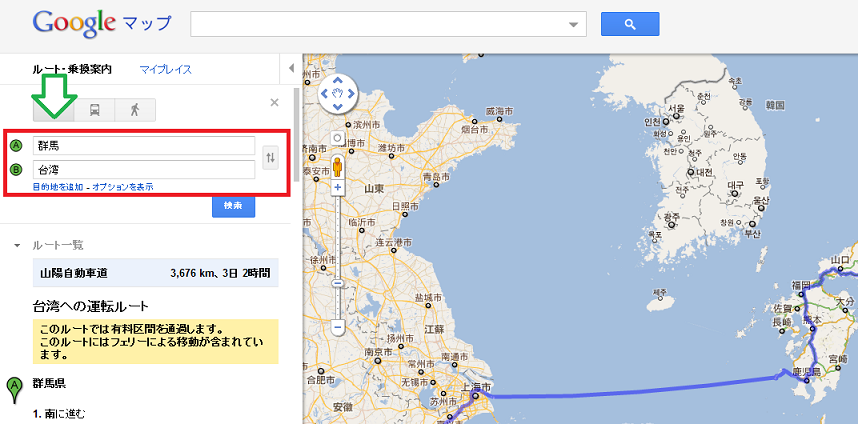
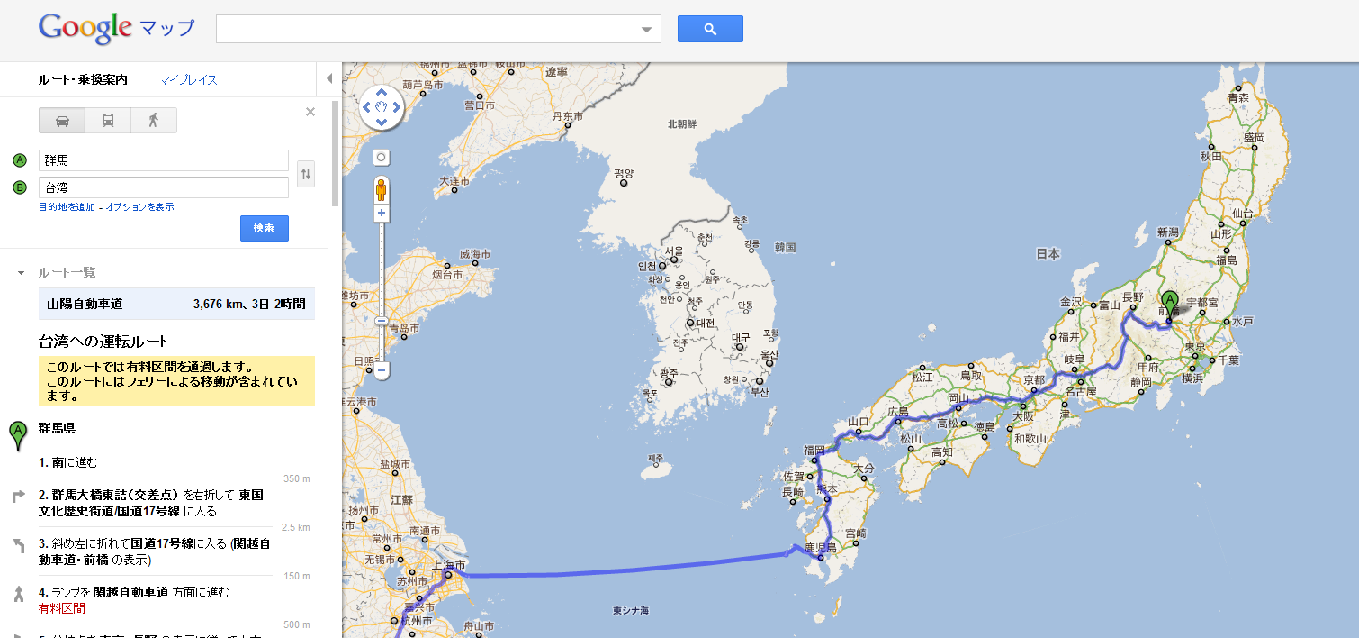
①ますは、ルート設定に「群馬」から「台湾」にして下さい！<br />
何故？群馬と台湾なのかは、不明です（笑）<br />
<a target="_blank" href="//iphoneninjya.blog.shinobi.jp/File/9a4bd901.png"><img border="0" alt="9a4bd901.png" src="//iphoneninjya.blog.shinobi.jp/Img/1311518060/" /><br />
<br />
</a><br />
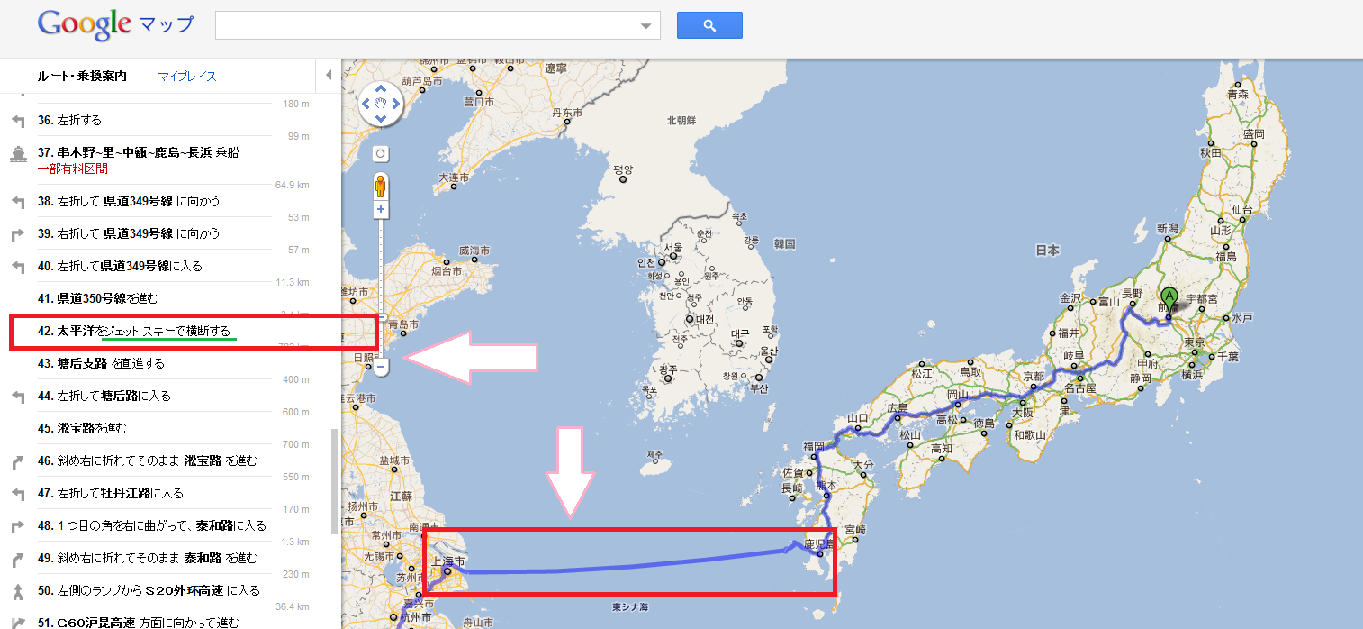
②そーすると、不思議不思議・・・・<br />
九州から海の上を渡るルートがでてきます！<br />
これは、どのように渡るのか見てみましょう～<br />
<a target="_blank" href="//iphoneninjya.blog.shinobi.jp/File/8ee29b46.png"><img border="0" alt="8ee29b46.png" src="//iphoneninjya.blog.shinobi.jp/Img/1311518061/" /></a><br />
<br />
<br />
③左のルート詳細の４２番をチェック・・・・・<br />
<br />
<a target="_blank" href="//iphoneninjya.blog.shinobi.jp/File/3e67c37c.png"><img border="0" alt="3e67c37c.png" src="//iphoneninjya.blog.shinobi.jp/Img/1311518279/" /></a><br />
<br />
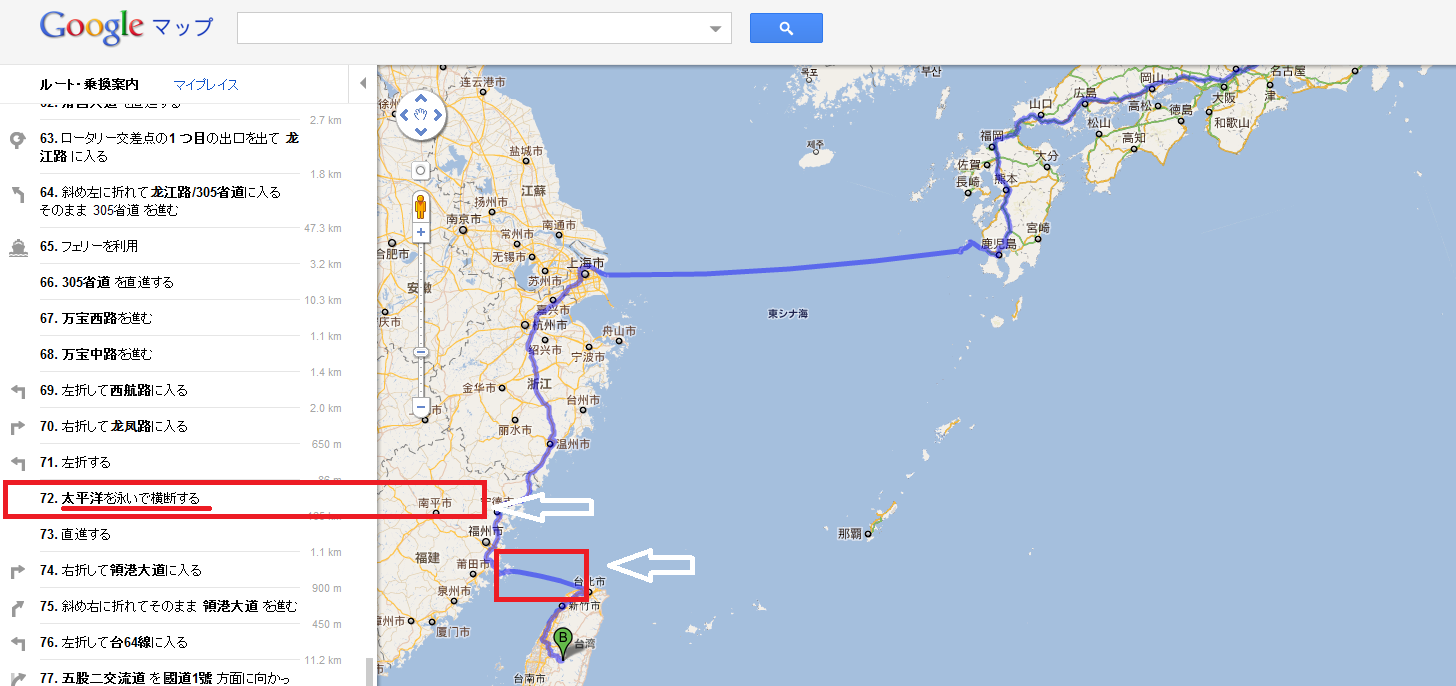
④７２番もチエックすると<br />
「泳いで横断するになってる」<br />
<a target="_blank" href="//iphoneninjya.blog.shinobi.jp/File/b2d1bc2e.png"><img border="0" alt="b2d1bc2e.png" src="//iphoneninjya.blog.shinobi.jp/Img/1311518496/" /></a><br />
以上です！！！<br />
グーグルマップも面白いですね～<br />
<br />
ちなみに「群馬」かあらアメリカも検索すると楽しい結果がでますよぉ～<br />
是非、みんなに教えてあげよう！！！<br />
<a class="twitter-share-button" data-lang="ja" data-via="iphone_room" data-count="vertical" data-url="http://iphoneninjya.blog.shinobi.jp/Entry/31/" href="http://twitter.com/share">ツイート</a><script type="text/javascript" src="http://platform.twitter.com/widgets.js"></script> <br /><br />

<iframe src="http://www.facebook.com/widgets/like.php?href=http://iphoneninjya.blog.shinobi.jp/Entry/31/" frameborder="0" scrolling="no" style="border-bottom: medium none; border-left: medium none; width: 450px; height: 80px; border-top: medium none; border-right: medium none"></iframe><script type="text/javascript"><!--
google_ad_client = "pub-0953938874828968";
/* 拡販推進室336x280 */
google_ad_slot = "9110075246";
google_ad_width = 336;
google_ad_height = 280;
//-->
</script><script type="text/javascript"
src="http://pagead2.googlesyndication.com/pagead/show_ads.js">
</script>]]> 
    </content>
    <author>
            <name>sato atsutoshi</name>
        </author>
  </entry>
  <entry>
    <id>iphoneninjya.blog.shinobi.jp://entry/30</id>
    <link rel="alternate" type="text/html" href="http://iphoneninjya.blog.shinobi.jp/%E3%81%8A%E5%8B%A7%E3%82%81%E9%9D%A2%E7%99%BD%E3%81%84%E3%82%A2%E3%83%97%E3%83%AA/%E5%AF%8C%E5%A3%AB%E5%B1%B1%E7%99%BB%E5%B1%B1%E3%81%A7%E3%81%8B%E3%81%AA%E3%82%8A%E4%BD%BF%E3%81%88%E3%81%9F%E3%82%A2%E3%83%97%E3%83%AA%E3%81%AE%E3%81%94%E7%B4%B9%E4%BB%8B%EF%BD%9E" />
    <published>2011-07-20T01:30:36+09:00</published> 
    <updated>2011-07-20T01:30:36+09:00</updated> 
    <category term="お勧め面白いアプリ" label="お勧め面白いアプリ" />
    <title>富士山登山でかなり使えたアプリのご紹介～</title>
    <content mode="escaped" type="text/html" xml:lang="utf-8"> 
      <![CDATA[&nbsp;先日、富士山に登山に行ってきました！<br />
<br />
今回のミッションは、夜に登って山頂で御来光（日の出）を見ること。<br />
<br />
iPhoneは、肌身離さず持って行きました。<br />
電波バリバリあるし、ソフトバンクなかなかやるなぁ～って感じで登って行くと<br />
星空が凄くでてました！<br />
<br />
そんな時にあの星はなんだっけ？なんてならないような<br />
アプリのご紹介デス！<br />
<br />
その前に、ご来光の写真をどうぞ！富士山オススメです！<br />
<br />
まずは、朝の４時！日の出が登る３０分前！<br />
撮影は、iPhone4　かなり綺麗に撮れました☆<br />
<a target="_blank" href="//iphoneninjya.blog.shinobi.jp/File/7d92659e.jpeg"><img alt="7d92659e.jpeg" border="0" src="//iphoneninjya.blog.shinobi.jp/Img/1311091957/" /><br />
<br />
<br type="_moz" />
</a>日の出きたぁ～素晴らしき景色☆<br />
iPhoneを使ってtwitterやったりFBやったり、ツイキャスで生中継したり・・・<br />
<a target="_blank" href="//iphoneninjya.blog.shinobi.jp/File/c57ca6b2.jpeg"><img alt="c57ca6b2.jpeg" border="0" src="//iphoneninjya.blog.shinobi.jp/Img/1311091958/" /><br />
<br />
<br type="_moz" />
</a>さてさて、今回の富士登山で星空を見るときの素晴らしいアプリのご紹介！<br />
その名は・・・<br />
<a target="itunes_store" href="http://click.linksynergy.com/fs-bin/stat?id=RFrvo7ej5/s&amp;offerid=94348&amp;type=3&amp;subid=0&amp;tmpid=2192&amp;RD_PARM1=http%253A%252F%252Fitunes.apple.com%252Fjp%252Fapp%252Fid295430577%253Fmt%253D8%2526uo%253D4%2526partnerId%253D30">Star Walk -  5つ星の天体観測ガイド - Vito Technology Inc.</a> <br />
<br />
要は、GPSを使って星空を確認できるということ。<br />
この手のアプリは、私自身色々試しましたがこのアプリが一番精度と使い勝手が良いです！<br />
<br />
<a href="http://click.linksynergy.com/fs-bin/click?id=RFrvo7ej5/s&amp;offerid=94348.4295430577&amp;type=2&amp;subid=0"><img border="0" alt="" src="http://a1354.phobos.apple.com/us/r1000/012/Purple/4c/49/d5/mzi.lbykhmxy.png" /></a><img border="0" width="1" height="1" alt="" src="http://ad.linksynergy.com/fs-bin/show?id=RFrvo7ej5/s&amp;bids=94348.4295430577&amp;type=2&amp;subid=0" /><a target="itunes_store" href="http://click.linksynergy.com/fs-bin/stat?id=RFrvo7ej5/s&amp;offerid=94348&amp;type=3&amp;subid=0&amp;tmpid=2192&amp;RD_PARM1=http%253A%252F%252Fitunes.apple.com%252Fjp%252Fapp%252Fid295430577%253Fmt%253D8%2526uo%253D4%2526partnerId%253D30"><img alt="Star Walk -  5つ星の天体観測ガイド - Vito Technology Inc." style="border: 0;" src="http://ax.phobos.apple.com.edgesuite.net/images/web/linkmaker/badge_appstore-lrg.gif" /></a> <br />
<br />
見た目もかなり良い！<br />
これを使っているとき、流れ星も見ることができて感動しました。<br />
オススメです！<br />
<a target="_blank" href="//iphoneninjya.blog.shinobi.jp/File/b0a7ee72.png"><img alt="b0a7ee72.png" border="0" src="//iphoneninjya.blog.shinobi.jp/Img/1311091959/" /></a><br />
<br />
<br />
以上、ご報告でした・・・・<br />
富士登山に行く方は気をつけて下さいね！<br type="_moz" />
<a href="http://twitter.com/share" class="twitter-share-button" data-url="http://iphoneninjya.blog.shinobi.jp/Entry/30/" data-count="vertical" data-via="iphone_room" data-lang="ja">ツイート</a><script type="text/javascript" src="http://platform.twitter.com/widgets.js"></script><br />
<script type="text/javascript"><!--
google_ad_client = "pub-0953938874828968";
/* 拡販推進室336x280 */
google_ad_slot = "9110075246";
google_ad_width = 336;
google_ad_height = 280;
//-->
</script> <script type="text/javascript"
src="http://pagead2.googlesyndication.com/pagead/show_ads.js">
</script>]]> 
    </content>
    <author>
            <name>sato atsutoshi</name>
        </author>
  </entry>
  <entry>
    <id>iphoneninjya.blog.shinobi.jp://entry/29</id>
    <link rel="alternate" type="text/html" href="http://iphoneninjya.blog.shinobi.jp/iphone%E9%9D%A2%E7%99%BD%E3%82%B0%E3%83%83%E3%82%BA/usb%E3%81%8C%E3%81%82%E3%82%8C%E3%81%B0%E3%82%BD%E3%83%BC%E3%83%A9%E3%83%BC%E7%99%BA%E9%9B%BB%E3%81%8C%E3%81%A7%E3%81%8D%E3%82%8B%E3%80%8C%E3%83%91%E3%83%AF%E3%83%BC%E3%83%95%E3%82%A3%E3%83%AB%E3%83%A0powerfilm%20%E3%80%8Cusb%20-%20aa%20solar%20charger%E3%80%8D" />
    <published>2011-07-09T21:05:18+09:00</published> 
    <updated>2011-07-09T21:05:18+09:00</updated> 
    <category term="iphone面白グッズ" label="iphone面白グッズ" />
    <title>USBがあればソーラー発電ができる「パワーフィルムPowerFilm 「USB + AA SOLAR CHARGER」</title>
    <content mode="escaped" type="text/html" xml:lang="utf-8"> 
      <![CDATA[<p>本日「iPhone拡販推進室」がご紹介致しますアイテムは、<br />
<br />
その名も<a name="amazletlink" target="_blank" href="http://www.amazon.co.jp/exec/obidos/ASIN/B001RMBHMK/gopro-22/ref=nosim/">パワーフィルム PowerFilm 「USB + AA SOLAR CHARGER」（ソーラー・チャージャー）</a>  <br />
<br />
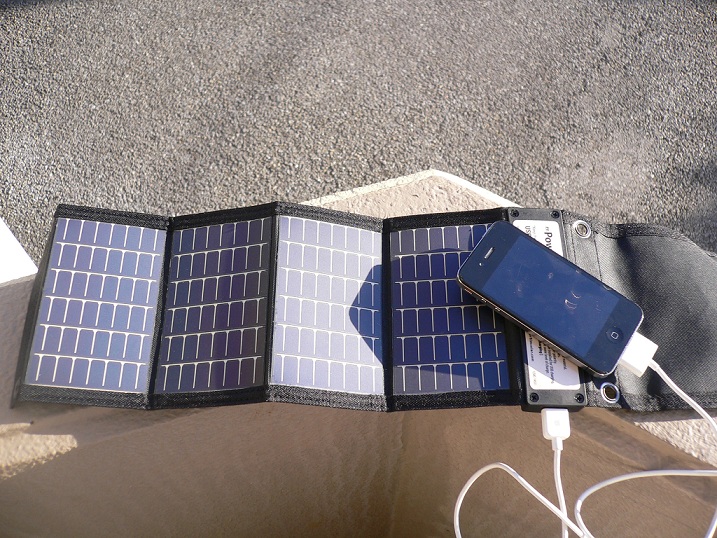
何かって言うと・・・  ソーラーで発電できるアイテムなのです！<br />
アメリカの特殊部隊でも使われているモノと同じモノです。<br />
USBのコネクターがあるので、iPhoneとかデジカメとか・・・・何でも充電可能！ しかもコンパクトで裏側にエネループが2本充電できる優れもの・・・・  ではご紹介致します！<br />
<br />
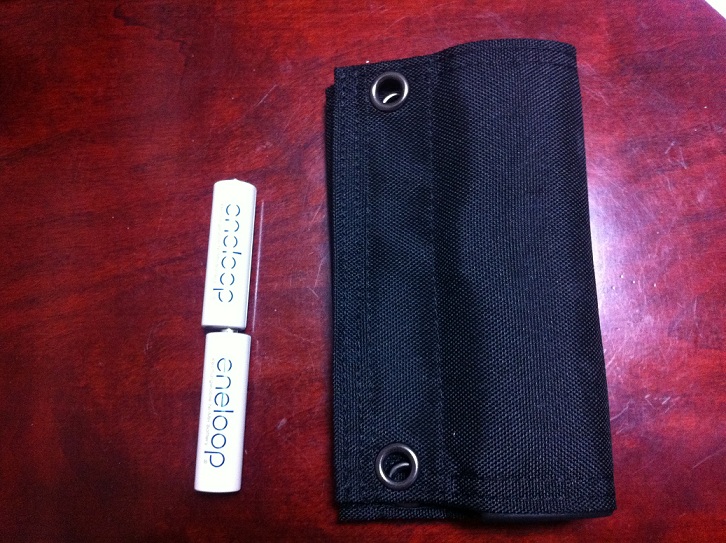
①小さくまとまり、見た目もコンパクトです！</p>
<br />
<a target="_blank" href="//iphoneninjya.blog.shinobi.jp/File/IMG_00400.jpg"><img alt="IMG_00400.jpg" border="0" src="//iphoneninjya.blog.shinobi.jp/Img/1310207348/" /><br />
</a>
<p><br />
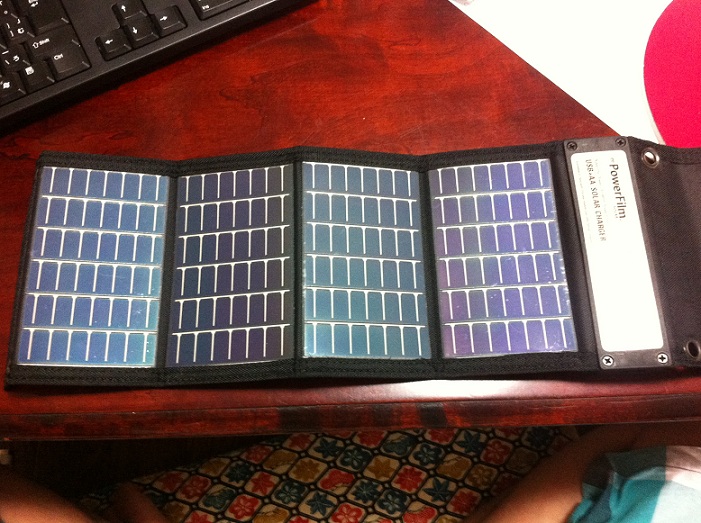
②広げると、こんな感じです！とても薄くてしっかりしています。<br />
<a target="_blank" href="//iphoneninjya.blog.shinobi.jp/File/IMG_00401.jpg"><img alt="IMG_00401.jpg" border="0" src="//iphoneninjya.blog.shinobi.jp/Img/1310207349/" /><br />
</a></p>
<p><br />
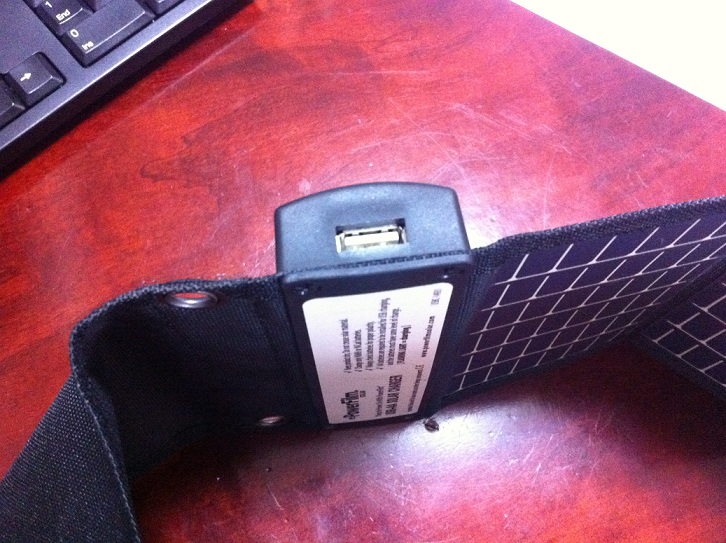
③USBコネクターも付いているので、iPhoneやデジカメが充電できる！<br />
しかし、驚きはこれだけではないのです（笑）<br />
<u><a target="_blank" href="//iphoneninjya.blog.shinobi.jp/File/IMG_00402.jpg"><img alt="IMG_00402.jpg" border="0" src="//iphoneninjya.blog.shinobi.jp/Img/1310207421/" /></a><br />
<br />
<br />
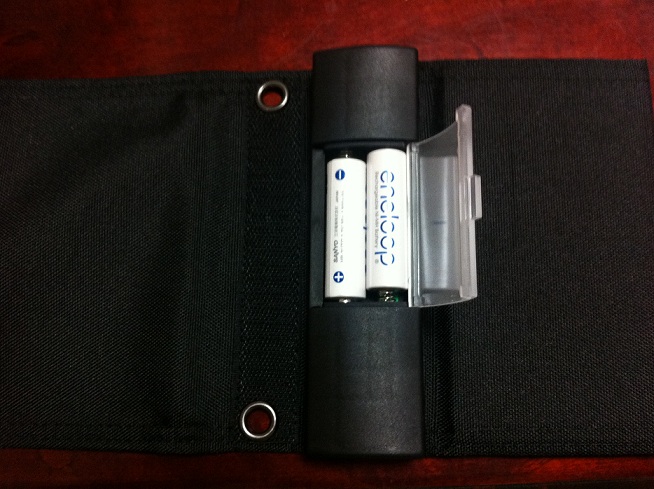
</u>④なんと裏には、「エネループ」が2本、充電できるのです！！！<br />
<a target="_blank" href="//iphoneninjya.blog.shinobi.jp/File/IMG_00403.jpg"><img alt="IMG_00403.jpg" border="0" src="//iphoneninjya.blog.shinobi.jp/Img/1310207441/" /></a><br />
<u><br />
<br />
</u>⑤こんな感じで外で充電可能！「海」「山」「自転車」「緊急時」なんでも使えます！<br />
<u><a target="_blank" href="//iphoneninjya.blog.shinobi.jp/File/P1190534.JPG"><img alt="P1190534.JPG" border="0" src="//iphoneninjya.blog.shinobi.jp/Img/1310207457/" /></a><br />
</u><br />
<br />
以上、<a name="amazletlink" target="_blank" href="http://www.amazon.co.jp/exec/obidos/ASIN/B001RMBHMK/gopro-22/ref=nosim/">パワーフィルム PowerFilm 「USB + AA SOLAR CHARGER」（ソーラー・チャージャー）</a> の紹介でした！<br />
<br />
一個持っておくと便利です！<br />
日本に入ってきたばかりです！品薄にスグになってしまうので<br />
購入は、お早めにどぉぞ！<br />
<br />
<a target="_blank" href="//iphoneninjya.blog.shinobi.jp/File/buy.jpg"><img alt="buy.jpg" border="0" src="//iphoneninjya.blog.shinobi.jp/Img/1310213171/" /><br />
</a></p>
<br />
<div class="amazlet-box" style="margin-bottom:0px;">
<div class="amazlet-image" style="float:left;margin:0px 12px 1px 0px;"><a name="amazletlink" target="_blank" href="http://www.amazon.co.jp/exec/obidos/ASIN/B001RMBHMK/gopro-22/ref=nosim/"><img alt="パワーフィルム PowerFilm 「USB + AA SOLAR CHARGER」（ソーラー・チャージャー）" style="border: none;" src="http://ecx.images-amazon.com/images/I/41-6aWTEO6L._SL160_.jpg" /></a></div>
<div class="amazlet-info" style="line-height:120%; margin-bottom: 10px">
<div class="amazlet-name" style="margin-bottom:10px;line-height:120%"><a name="amazletlink" target="_blank" href="http://www.amazon.co.jp/exec/obidos/ASIN/B001RMBHMK/gopro-22/ref=nosim/">パワーフィルム PowerFilm 「USB + AA SOLAR CHARGER」（ソーラー・チャージャー）</a>
<div class="amazlet-powered-date" style="font-size:80%;margin-top:5px;line-height:120%">posted with <a title="パワーフィルム PowerFilm 「USB + AA SOLAR CHARGER」（ソーラー・チャージャー）" target="_blank" href="http://www.amazlet.com/browse/ASIN/B001RMBHMK/gopro-22/ref=nosim/">amazlet</a> at 11.07.09</div>
</div>
<div class="amazlet-detail">米国PowerFilm社 <br />
売り上げランキング: 300</div>
<div class="amazlet-sub-info" style="float: left;">
<div class="amazlet-link" style="margin-top: 5px"><a name="amazletlink" target="_blank" href="http://www.amazon.co.jp/exec/obidos/ASIN/B001RMBHMK/gopro-22/ref=nosim/">Amazon.co.jp で詳細を見る</a></div>
</div>
</div>
<div class="amazlet-footer" style="clear: left">&nbsp;</div>
</div>
<a class="twitter-share-button" data-url="http://iphoneninjya.blog.shinobi.jp/Entry/29/" data-count="vertical" data-via="iphone_room" data-lang="ja" href="http://twitter.com/share">Tweet</a><script type="text/javascript" src="http://platform.twitter.com/widgets.js"></script><br />
<script type="text/javascript"><!--
google_ad_client = "pub-0953938874828968";
/* 拡販推進室336x280 */
google_ad_slot = "9110075246";
google_ad_width = 336;
google_ad_height = 280;
//-->
</script>
<script type="text/javascript"
src="http://pagead2.googlesyndication.com/pagead/show_ads.js">
</script>]]> 
    </content>
    <author>
            <name>sato atsutoshi</name>
        </author>
  </entry>
  <entry>
    <id>iphoneninjya.blog.shinobi.jp://entry/28</id>
    <link rel="alternate" type="text/html" href="http://iphoneninjya.blog.shinobi.jp/24%E6%99%82%E9%96%93%E7%84%A1%E6%96%99%E9%80%9A%E8%A9%B1%E3%82%A2%E3%83%97%E3%83%AA/facebook%E3%81%A724%E6%99%82%E9%96%93%E9%80%9A%E8%A9%B1%E7%84%A1%E6%96%99%E3%81%8C%E5%8F%AF%E8%83%BD%E3%82%A2%E3%83%97%E3%83%AAreengo" />
    <published>2011-05-14T20:10:22+09:00</published> 
    <updated>2011-05-14T20:10:22+09:00</updated> 
    <category term="24時間無料通話アプリ" label="24時間無料通話アプリ" />
    <title>Facebookで24時間通話無料が可能アプリReengo</title>
    <content mode="escaped" type="text/html" xml:lang="utf-8"> 
      <![CDATA[<p><font color="#ff0000"><strong>iPhone拡販推進室に「Google+１」を&darr;&darr;装着しました<br />
良ければ押してね！</strong></font></p>
<p>&nbsp;</p>
<!-- 次のタグを +1 ボタンを表示する箇所に貼り付けてください --> <g:plusone></g:plusone> <br />
<br />
<br />
&nbsp;Facebookで24時間通話無料が可能アプリ<br />
<br />
「Renngo」登場☆<br />
<br />
今、ノリにノッてる面白法人カヤックが凄いアプリをだしましたぁ～<br />
<br />
Facebookのアカウントがあれば友達に無料で電話ができてしまうのです！<br />
<br />
しかも使って見ましたが、「音質も素晴らしくいい・・・」<br />
<br />
では、ご紹介いたします！<br />
<br />
①まず、起動！設定はほとんどありませんが（笑）<br />
<br />
<div style="text-align: center;"><a target="_blank" href="//iphoneninjya.blog.shinobi.jp/File/IMG_00397.png"><img border="0" alt="IMG_00396.png" src="//iphoneninjya.blog.shinobi.jp/Img/1305182592/" /><br />
<br />
</a></div>
<div style="text-align: left;">&nbsp;</div>
<div style="text-align: left;"><br />
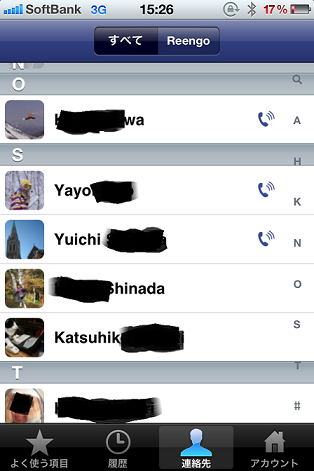
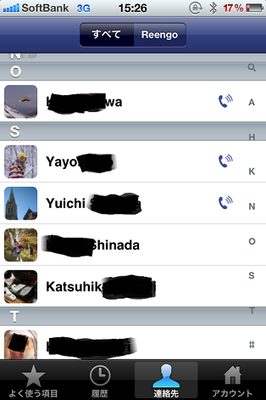
②起動時にFacebookのアカウントをいれるだけ・・・そうタダこれだけなのです☆<br />
Facebookの友達の一覧がでます。<br />
友達の横に電話マークがある人は、Renngoアプリが入っている人です。<br />
（お互いRenngoが入っていなければ通話はできません）<a target="_blank" href="//iphoneninjya.blog.shinobi.jp/File/IMG_00397.png"><br />
</a></div>
<div style="text-align: center;"><img border="0" alt="IMG_00397.png" src="//iphoneninjya.blog.shinobi.jp/Img/1305182692/" /><br />
&nbsp;</div>
<div style="text-align: left;"><br />
③後は、電話したい人をタップすればかかります！</div>
<div style="text-align: left;">　しかも呼び出しの写真はFacebookのプロフィールになる。なんかイイ～</div>
<div style="text-align: center;"><a target="_blank" href="//iphoneninjya.blog.shinobi.jp/File/IMG_00399.png"><img border="0" alt="IMG_00399.png" src="//iphoneninjya.blog.shinobi.jp/Img/1305182693/" /><br />
<br />
</a></div>
<br />
<a data-lang="ja" data-via="iphone_room" data-count="vertical" data-url="http://iphoneninjya.blog.shinobi.jp/Entry/28/" class="twitter-share-button" href="http://twitter.com/share">Tweet</a><script type="text/javascript" src="http://platform.twitter.com/widgets.js"></script><br />
<font color="#ff6600"><strong><font size="3"><br />
</font></strong></font>
<div style="text-align: center;"><font color="#ff6600"><strong><font size="3">ダウンロードはこちらより</font></strong></font></div>
<br />
<a href="http://click.linksynergy.com/fs-bin/click?id=RFrvo7ej5/s&amp;subid=&amp;offerid=94348.1&amp;type=10&amp;tmpid=5572&amp;RD_PARM1=http%3A%2F%2Fclick.linksynergy.com%2Ffs-bin%2Fstat%3Fid%3DRFrvo7ej5%2Fs%2526offerid%3D94348%2526type%3D3%2526subid%3D0%2526tmpid%3D2192%2526RD_PARM1%3Dhttp%25253A%25252F%25252Fitunes.apple.com%25252Fjp%25252Fapp%25252Fid430589998%25253Fmt%25253D8%252526uo%25253D4%252526partnerId%25253D30"><img border="0" alt="icon" src="//iphoneninjya.blog.shinobi.jp/File/reengo.jpg" /></a> <img width="1" height="1" alt="icon" src="http://ad.linksynergy.com/fs-bin/show?id=RFrvo7ej5/s&amp;bids=94348.1&amp;type=10" />  <a target="itunes_store" href="http://click.linksynergy.com/fs-bin/stat?id=RFrvo7ej5/s&amp;offerid=94348&amp;type=3&amp;subid=0&amp;tmpid=2192&amp;RD_PARM1=http%253A%252F%252Fitunes.apple.com%252Fjp%252Fapp%252Fid430589998%253Fmt%253D8%2526uo%253D4%2526partnerId%253D30"><img style="border: 0pt none;" alt="Reengo - 番号なしで電話できるアプリ - KAYAC Inc." src="http://ax.phobos.apple.com.edgesuite.net/images/web/linkmaker/badge_appstore-lrg.gif" /></a><br />
<script type="text/javascript"><!--
google_ad_client = "pub-0953938874828968";
/* iPhone300x250 */
google_ad_slot = "1346522341";
google_ad_width = 300;
google_ad_height = 250;
//-->
</script><script type="text/javascript"
src="http://pagead2.googlesyndication.com/pagead/show_ads.js">
</script><br />
<!--FREE AREAロゴ--><a target="_blank" href="//iphoneninjya.blog.shinobi.jp/File/78696ae0.gif"><img border="0" alt="" src="//iphoneninjya.blog.shinobi.jp/Img/1290495234/" /></a><br />
<br />
<!--タンゴの記事--><a href="http://iphoneninjya.blog.shinobi.jp/Entry/20/"><font color="#3d81ee">Tango Video Calls 使い方 ☆３Gでも無料でテレビ電話☆無料アプリ</font></a><br />
<a data-lang="ja" data-count="horizontal" data-via="iphone_room" data-url="http://iphoneninjya.blog.shinobi.jp/Entry/20/" class="twitter-share-button" href="http://twitter.com/share">Tweet</a><script type="text/javascript" src="http://platform.twitter.com/widgets.js"></script><br />
<br />
<!--photoageの記事--><a href="http://iphoneninjya.blog.shinobi.jp/Entry/21/"><font color="#3d81ee">「Photo Age」写真を撮ると年齢が分かる１１５円なり。</font></a><br />
<a data-lang="ja" data-count="horizontal" data-via="iphone_room" data-url="http://iphoneninjya.blog.shinobi.jp/Entry/21/" class="twitter-share-button" href="http://twitter.com/share">Tweet</a><script type="text/javascript" src="http://platform.twitter.com/widgets.js"></script> <br />
<br />
<!--skyfireの記事--><a href="http://iphoneninjya.blog.shinobi.jp/Entry/22/"><font color="#3d81ee">Skyfire iPhone 使い方です。　FLASHが見れる・・・</font></a><br />
<a data-lang="ja" data-count="horizontal" data-via="iphone_room" data-url="http://iphoneninjya.blog.shinobi.jp/Entry/22/" class="twitter-share-button" href="http://twitter.com/share">Tweet</a><script type="text/javascript" src="http://platform.twitter.com/widgets.js"></script><br />
<br />
<br />]]> 
    </content>
    <author>
            <name>sato atsutoshi</name>
        </author>
  </entry>
  <entry>
    <id>iphoneninjya.blog.shinobi.jp://entry/27</id>
    <link rel="alternate" type="text/html" href="http://iphoneninjya.blog.shinobi.jp/%E8%B6%85%E5%BF%85%E9%A0%88%E3%82%A2%E3%83%97%E3%83%AA/%E8%AA%B0%E3%82%82%E6%8C%81%E3%81%A3%E3%81%A6%E3%81%84%E3%81%AA%E3%81%84iphone%E3%82%B0%E3%83%83%E3%82%BA%E3%81%AE%E7%B4%B9%E4%BB%8B" />
    <published>2011-03-30T02:00:51+09:00</published> 
    <updated>2011-03-30T02:00:51+09:00</updated> 
    <category term="超必須アプリ" label="超必須アプリ" />
    <title>誰も持っていないiphoneグッズの紹介</title>
    <content mode="escaped" type="text/html" xml:lang="utf-8"> 
      <![CDATA[<div style="text-align: center"><a target="_blank" href="//iphoneninjya.blog.shinobi.jp/File/3b6a96cf.jpg"><img border="0" alt="3b6a96cf.jpg" src="//iphoneninjya.blog.shinobi.jp/Img/1277038889/" /></a><br />
<font size="3"><strong><font color="#ff0000">これ、&uarr;何だと思いますか？？</font></strong></font><br />
<br />
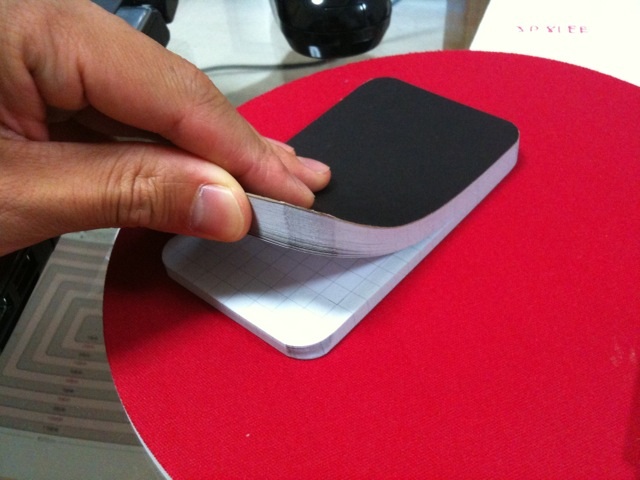
タダのメモ帳ではないのです(笑)<br />
<br />
実は・・・・・</div>
<br />
<div style="text-align: center"><br />
<a target="_blank" href="//iphoneninjya.blog.shinobi.jp/File/qtW9KlsnjQZ1.jpg"><img border="0" alt="qtW9KlsnjQZ1.jpg" src="//iphoneninjya.blog.shinobi.jp/Img/1277038899/" /></a><br />
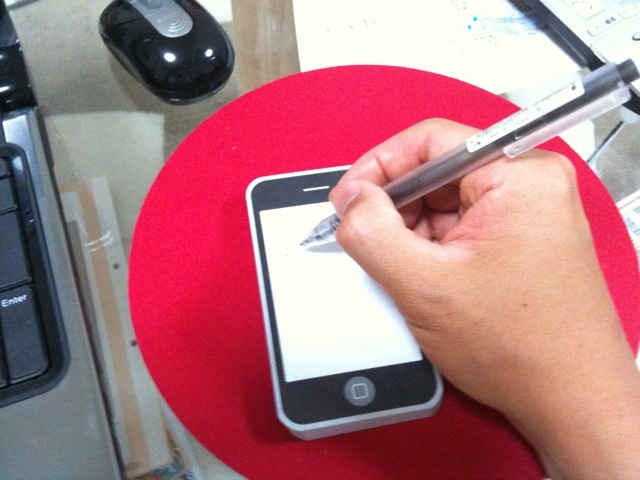
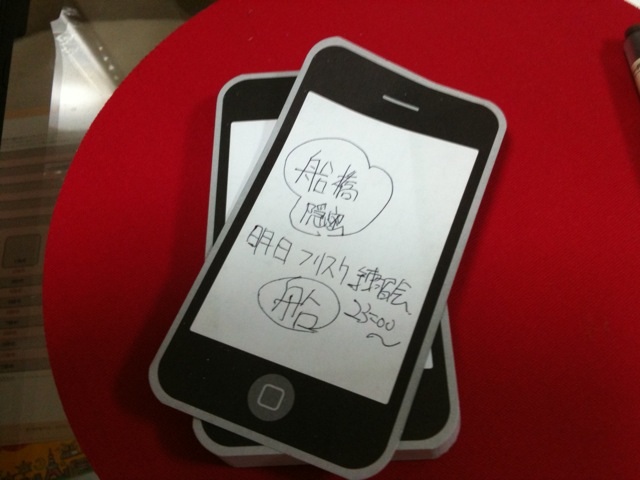
iphone型(笑)・・・・・マニアックでしょ～<br />
&nbsp;</div>
<div style="text-align: center">誰も絶対持ってないし・・・・<br />
<br />
俺は、これを見たとき一目惚れ☆会社で目立てる<br />
&nbsp;</div>
<div style="text-align: center">ちょっとした時に人と違うのを持ちたい方にお勧め☆ウケル<br />
<br />
<a target="_blank" href="//iphoneninjya.blog.shinobi.jp/File/vPObZliG6q86.jpg"><img border="0" alt="vPObZliG6q86.jpg" src="//iphoneninjya.blog.shinobi.jp/Img/1277038911/" /></a></div>
<div style="text-align: center"><br />
紙は、しっかりとした固い紙で、安さを感じさせません・・・・<br />
<br />
是非どぉぞ・・・・<br />
<br />
下記から直接買えますぉぉ～<br />
<br />
<br />
<div class="amazlet-box" style="margin-bottom: 0px">
<div class="amazlet-image" style="float: left"><a target="_blank" name="amazletlink" href="http://www.amazon.co.jp/exec/obidos/ASIN/B003I4RC9M/funabashionmi-22/ref=nosim/"><img alt="Notepod 2-pack" style="border-bottom: medium none; border-left: medium none; border-top: medium none; border-right: medium none" src="http://ecx.images-amazon.com/images/I/41elPMMtLqL._SL160_.jpg" /></a></div>
<div class="amazlet-info" style="line-height: 120%; float: left; margin-left: 15px">
<div class="amazlet-name" style="line-height: 120%; margin-bottom: 10px"><a target="_blank" name="amazletlink" href="http://www.amazon.co.jp/exec/obidos/ASIN/B003I4RC9M/funabashionmi-22/ref=nosim/">Notepod 2-pack</a>
<div class="amazlet-powered-date" style="line-height: 120%; margin-top: 5px; font-family: verdana; font-size: 7pt">posted with <a title="Notepod 2-pack" target="_blank" href="http://www.amazlet.com/browse/ASIN/B003I4RC9M/funabashionmi-22/ref=nosim/">amazlet</a> at 10.06.20</div>
</div>
<div class="amazlet-detail">pleiades <br />
売り上げランキング: 6702<br />
&nbsp;</div>
<div class="amazlet-link" style="margin-top: 5px"><a target="_blank" name="amazletlink" href="http://www.amazon.co.jp/exec/obidos/ASIN/B003I4RC9M/funabashionmi-22/ref=nosim/">Amazon.co.jp で詳細を見る</a></div>
</div>
<div class="amazlet-footer" style="clear: left">&nbsp;</div>
</div>
&nbsp;</div>]]> 
    </content>
    <author>
            <name>sato atsutoshi</name>
        </author>
  </entry>
  <entry>
    <id>iphoneninjya.blog.shinobi.jp://entry/25</id>
    <link rel="alternate" type="text/html" href="http://iphoneninjya.blog.shinobi.jp/iphone%E3%82%B1%E3%83%BC%E3%82%B9/%E3%81%8B%E3%82%8F%E3%81%84%E3%81%84%E7%8C%AB%E3%81%AEiphone%E3%82%B1%E3%83%BC%E3%82%B9%E7%89%B9%E9%9B%86" />
    <published>2010-12-06T23:31:41+09:00</published> 
    <updated>2010-12-06T23:31:41+09:00</updated> 
    <category term="iPhoneケース" label="iPhoneケース" />
    <title>かわいい猫のiPhoneケース特集</title>
    <content mode="escaped" type="text/html" xml:lang="utf-8"> 
      <![CDATA[<p>かわいい猫のiPhoneケース特集デス！<br />
<br />
猫好きにはたまらない一品(笑)<br />
<br />
さぁ～このケースを付けて町にでよう～<br />
<br />
ではでは、ご紹介です☆<br />
<br />
<strong><font color="#ff0000">１、猫iPhoneケース　猫の雪ずきん(iphone4 ,iPhone3GS)<br />
色は５種類あります。<br />
</font></strong>　　<a href="http://clubt.jp/product/146311.html"><strong><font size="3">猫iPhoneケース　猫の雪ずきん・詳細、購入はこちら</font></strong></a><strong><font size="3"><br />
</font></strong>  <img height="182" border="0" width="182" alt="猫のiPhoneケース１" src="//iphoneninjya.blog.shinobi.jp/Img/1292601489/" /> <img border="0" alt="猫のiPhoneケース２" style="width: 176px; height: 182px;" src="//iphoneninjya.blog.shinobi.jp/Img/1292601501/" /><br />
<br />
<br />
<strong><font color="#ff0000">２、猫iPhoneケース　エコ猫と地球(iPhone4, iPhone3GS)<br />
色は５種類あります。<br />
</font></strong>　　<a href="http://clubt.jp/product/147057.html"><strong><font size="3">猫iPhoneケース　エコ猫と地球・詳細購入はこちらより・・・・</font></strong></a><br />
<br />
<a target="_blank" href="http://clubt.jp/product/147057.html"><img border="0" alt="猫のiPnokeケース３" src="//iphoneninjya.blog.shinobi.jp/Img/1292770214/" /></a><a target="_blank" href="http://clubt.jp/product/147057.html"><img border="0" alt="猫のiPhoneケース４" src="//iphoneninjya.blog.shinobi.jp/Img/1292770262/" /></a><br />
<br />
<br />
<strong><font color="#ff0000">３、猫iPhoneケース　　エコ猫とマフラー(iPhone4 ,iPhone3GS)<br />
色は５種類あります。<br />
</font></strong>　　<a href="http://clubt.jp/product/146296.html"><strong><u><font size="3">猫iPhoneケース・エコ猫とマフラー詳細・購入はこちらより</font></u></strong></a><br />
<br />
<a target="_blank" href="http://clubt.jp/product/146296.html"><img border="0" alt="8233879_m.jpg" src="//iphoneninjya.blog.shinobi.jp/Img/1292770549/" /></a><a target="_blank" href="http://clubt.jp/product/146296.html"><img border="0" alt="8233875_m.jpg" src="//iphoneninjya.blog.shinobi.jp/Img/1292770608/" /></a></p>
<strong><font color="#ff0000"><br />
4、猫iphoneケース（iPhone4 . iPhone3GS）<br />
&nbsp; 色は５種類以上あります。</font></strong><br />
&nbsp; <a href="http://clubt.jp/product/146548.html"><strong><font size="3">詳細、購入はこちらより</font></strong></a><br />
<br />
<a target="_blank" href="http://clubt.jp/product/146548.html"><img border="0" alt="8266944_m.jpg" src="//iphoneninjya.blog.shinobi.jp/Img/1292771699/" /></a><a target="_blank" href="http://clubt.jp/product/146548.html"><img border="0" alt="8266947_m.jpg" src="//iphoneninjya.blog.shinobi.jp/Img/1292771700/" /></a><br />
<br />
もっと猫グッズが見たい方は是非どぉぞ!<br />
<!--ecoねこshop--> <a target="_blank" href="http://econeko.jpn.org/"><img border="0" alt="猫雑貨" src="//iphoneninjya.blog.shinobi.jp/Img/1288805966/" /></a><br />
<br />
<br />
かわいい猫のiPhoneケースでした。<br />
写真のケースは、iPhone4ですが３GSでも多数ご用意してあります。<br />
是非あなたのiPhoneにどぉぞ。<br />
<a class="twitter-share-button" data-count="vertical" href="http://twitter.com/share">Tweet</a><script type="text/javascript" src="http://platform.twitter.com/widgets.js"></script><br />
<!--FREE AREAロゴ-->  <a target="_blank" href="//iphoneninjya.blog.shinobi.jp/File/78696ae0.gif"><img border="0" alt="" src="//iphoneninjya.blog.shinobi.jp/Img/1290495234/" /></a><br />
<p><strong><font color="#ff0000"><font size="4"><br />
FLASHがiPhoneで見れる・・・<br />
「Sky Fire」アプリが 日本上陸しました～<br />
<font color="#0000ff">これで今まで見れなかったMixi動画も見れます！</font><br />
</font>&darr;&darr;まずは、ダウンロード&darr;&darr;</font></strong><br />
<a href="http://click.linksynergy.com/fs-bin/click?id=RFrvo7ej5/s&amp;subid=&amp;offerid=94348.1&amp;type=10&amp;tmpid=3910&amp;RD_PARM1=http%3A%2F%2Fitunes.apple.com%2Fjp%2Fapp%2Fskyfire-web-browser%2Fid384941497%3Fmt%3D8%2526ign-mpt%3Duo%253D4"><img border="0" style="width: 68px; height: 66px;" alt="icon" src="//iphoneninjya.blog.shinobi.jp/File/SSHOT~1.PNG" /></a> <img height="1" width="1" alt="icon" src="http://ad.linksynergy.com/fs-bin/show?id=RFrvo7ej5/s&amp;bids=94348.1&amp;type=10" /> <a target="itunes_store" href="http://click.linksynergy.com/fs-bin/stat?id=RFrvo7ej5/s&amp;offerid=94348&amp;type=3&amp;subid=0&amp;tmpid=2192&amp;RD_PARM1=http%253A%252F%252Fitunes.apple.com%252Fjp%252Fapp%252Fskyfire-web-browser%252Fid384941497%253Fmt%253D8%2526uo%253D4%2526partnerId%253D30"><img style="border: 0px none;" alt="Skyfire Web Browser - Skyfire Labs, Inc." src="http://ax.phobos.apple.com.edgesuite.net/images/web/linkmaker/badge_appstore-lrg.gif" /></a>&nbsp;<br />
<br />
<!--タンゴの記事-->  <a href="http://iphoneninjya.blog.shinobi.jp/Entry/20/"><font color="#3d81ee">Tango Video Calls 使い方 ☆３Gでも無料でテレビ電話☆無料アプリ</font></a><br />
<a data-lang="ja" data-via="iphone_room" data-count="horizontal" data-url="http://iphoneninjya.blog.shinobi.jp/Entry/20/" class="twitter-share-button" href="http://twitter.com/share">Tweet</a><script type="text/javascript" src="http://platform.twitter.com/widgets.js"></script><br />
<br />
<!--Viberの記事--> <a href="http://iphoneninjya.blog.shinobi.jp/Entry/21/"><font color="#3d81ee">Viber iPhone24時間通話無料アプリ　設定の仕方</font></a><font color="#3d81ee"><br />
<a data-via="iphone_room" data-count="horizontal" data-url="http://iphoneninjya.blog.shinobi.jp/Entry/24/" class="twitter-share-button" href="http://twitter.com/share">Tweet</a><script type="text/javascript" src="http://platform.twitter.com/widgets.js"></script><br />
<br />
<!--photoageの記事--> <a href="http://iphoneninjya.blog.shinobi.jp/Entry/21/"><font color="#3d81ee">「Photo Age」写真を撮ると年齢が分かる１１５円なり。</font></a><br />
<a data-lang="ja" data-via="iphone_room" data-count="horizontal" data-url="http://iphoneninjya.blog.shinobi.jp/Entry/21/" class="twitter-share-button" href="http://twitter.com/share">Tweet</a><script type="text/javascript" src="http://platform.twitter.com/widgets.js"></script> <br />
<br />
<!--skyfireの記事-->  <a href="http://iphoneninjya.blog.shinobi.jp/Entry/22/"><font color="#3d81ee">Skyfire iPhone 使い方です。　FLASHが見れる・・・</font></a><br />
<a data-lang="ja" data-via="iphone_room" data-count="horizontal" data-url="http://iphoneninjya.blog.shinobi.jp/Entry/22/" class="twitter-share-button" href="http://twitter.com/share">Tweet</a><script type="text/javascript" src="http://platform.twitter.com/widgets.js"></script><br />
<br />
<br />
<!--adlantis広告--> <script src='http://static.adlantis.jp/javascripts/AdLantisLoader.js' type='text/javascript' charset='utf-8'></script> <!-- Begin: Adlantis, Zone: [200枠] --> </font></p>
<div class="adlantiss_frame zid_23mgS3M4%2Ft4f%2BFg2RcUasg%3D%3D color_#3d81ee-#000000-#FFFFFF-#FFFFFF-#000000 container_iframe">&nbsp;</div>
<!-- End: Adlantis -->  <!--サイト内ロゴ--> <font color="#3d81ee"><a target="_blank" href="//iphoneninjya.blog.shinobi.jp/File/site.gif"><img border="0" alt="" src="//iphoneninjya.blog.shinobi.jp/Img/1290498974/" /></a>   <!--サイト内検索-->  </font>
<form id="cse-search-box" action="http://www.google.co.jp/cse">
    <font color="#3d81ee">  </font>
    <div><font color="#3d81ee">    <input type="hidden" value="partner-pub-0953938874828968:58r8t1h9li5" name="cx" />     <input type="hidden" value="Shift_JIS" name="ie" />     <input type="text" size="20" name="q" />     <input type="submit" value="検索" name="sa" />   </font></div>
</form>
<script type="text/javascript" src="http://www.google.co.jp/cse/brand?form=cse-search-box&amp;lang=ja"></script><font color="#3d81ee">  <br />
<br />
</font>]]> 
    </content>
    <author>
            <name>sato atsutoshi</name>
        </author>
  </entry>
  <entry>
    <id>iphoneninjya.blog.shinobi.jp://entry/24</id>
    <link rel="alternate" type="text/html" href="http://iphoneninjya.blog.shinobi.jp/24%E6%99%82%E9%96%93%E7%84%A1%E6%96%99%E9%80%9A%E8%A9%B1%E3%82%A2%E3%83%97%E3%83%AA/viber%20iphone24%E6%99%82%E9%96%93%E9%80%9A%E8%A9%B1%E7%84%A1%E6%96%99%E3%82%A2%E3%83%97%E3%83%AA%E3%80%80%E8%A8%AD%E5%AE%9A%E3%81%AE%E4%BB%95%E6%96%B9" />
    <published>2010-12-05T16:08:38+09:00</published> 
    <updated>2010-12-05T16:08:38+09:00</updated> 
    <category term="24時間無料通話アプリ" label="24時間無料通話アプリ" />
    <title>Viber iPhone24時間通話無料アプリ　設定の仕方</title>
    <content mode="escaped" type="text/html" xml:lang="utf-8"> 
      <![CDATA[<p><font color="#ff0000"><strong>iPhone拡販推進室に「Google+１」を&darr;&darr;装着しました<br />
良ければ押してね！</strong></font></p>
<p>&nbsp;</p>
<!-- 次のタグを +1 ボタンを表示する箇所に貼り付けてください --> <g:plusone></g:plusone> <br />
<br />
<br />
<p>謎が解けた！みんなできたので間違いない！！<br />
Viber のアクセスコードの取り方<br />
これを読んでこの通りにすれば必ずアクセスコードがきます(笑)<br />
<br />
<font color="#ff0000"><strong>〜追記〜２月<br />
ViberでアクセスコードがSMSで届かない場合に、コード登録画面の右上にHELPって<br />
ボタンがあります。<br />
そこから電話番号登録すると非通知で電話が掛かってきて、<br />
アクセスコードの音声案内がされるようになりました！！</strong></font><br />
<script type="text/javascript"><!--
google_ad_client = "pub-0953938874828968";
/* iphoneブログ200x200 */
google_ad_slot = "2169555986";
google_ad_width = 200;
google_ad_height = 200;
//-->
</script> <script type="text/javascript"
src="http://pagead2.googlesyndication.com/pagead/show_ads.js">
</script><br />
<br />
公式ページにも国際SMSを<font color="#0000ff"><font size="3"><strong>何通も送らず</strong></font></font>48時間ほど待って欲しいと書いてありますので気長に待ちましょう。<br />
時間はかかりますが、僕の周りは全員この方法で来てるので間違いないデス！<br />
<br />
<br />
<span style="color: black;"><span class="comment_text_color comment_text_Black">ＭＮＰで乗り換えた人には、 コードが送られてこないという噂はウソみたいです。</span></span><br />
<br />
<strong><font color="#ff0000">２４時間無料電話ができる　Viberのご紹介<br />
</font></strong><br />
まずは早速ダウンロード<br />
<a target="itunes_store" href="http://click.linksynergy.com/fs-bin/stat?id=RFrvo7ej5/s&amp;offerid=94348&amp;type=3&amp;subid=0&amp;tmpid=2192&amp;RD_PARM1=http%253A%252F%252Fitunes.apple.com%252Fjp%252Fapp%252Fviber-free-phone-calls%252Fid382617920%253Fmt%253D8%2526uo%253D4%2526partnerId%253D30"><img style="border: 0px none;" alt="Viber - Free Phone Calls - Viber Media, Inc." src="http://ax.phobos.apple.com.edgesuite.net/images/web/linkmaker/badge_appstore-lrg.gif" /></a> <br />
<a target="itunes_store" href="http://click.linksynergy.com/fs-bin/stat?id=RFrvo7ej5/s&amp;offerid=94348&amp;type=3&amp;subid=0&amp;tmpid=2192&amp;RD_PARM1=http%253A%252F%252Fitunes.apple.com%252Fjp%252Fapp%252Fviber-free-phone-calls%252Fid382617920%253Fmt%253D8%2526uo%253D4%2526partnerId%253D30">Viber - Free Phone Calls - Viber Media, Inc.</a>&nbsp;<br />
&nbsp;<br />
<br />
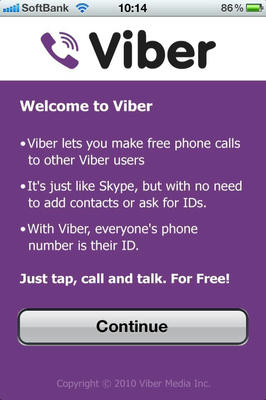
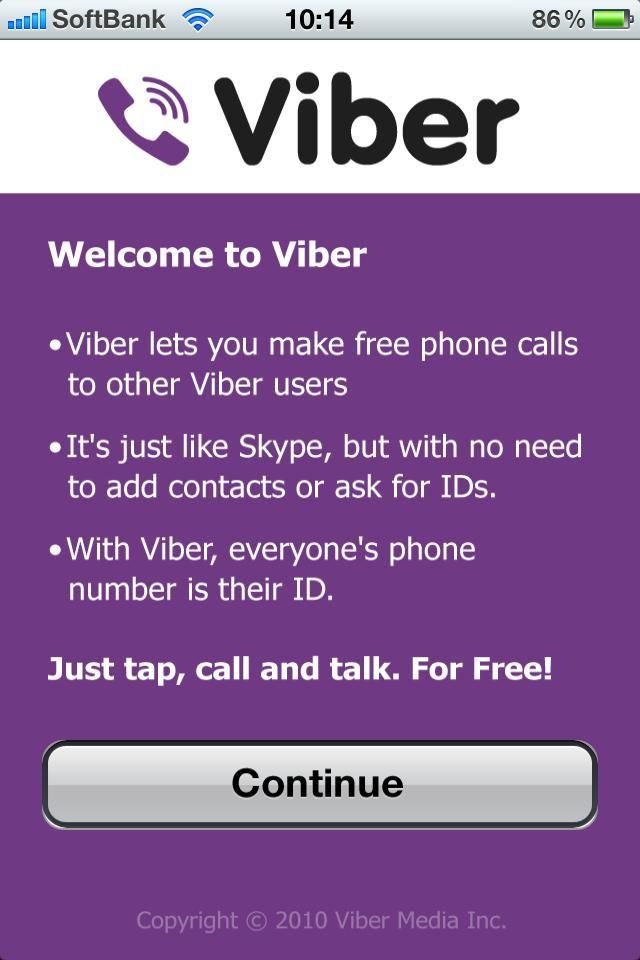
<strong><font color="#ff0000">①</font></strong>まず起動画面　Continueをタップ</p>
<p style="text-align: center;"><a target="_blank" href="//iphoneninjya.blog.shinobi.jp/File/11.jpg"><img border="0" alt="11.jpg" src="//iphoneninjya.blog.shinobi.jp/Img/1291533913/" /></a><br />
&nbsp;</p>
<p style="text-align: left;"><br />
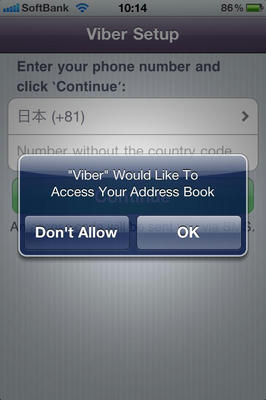
<font color="#ff0000"><strong>②</strong></font>これもOKをタップ！ココまでは楽勝☆問題はこれから(笑)</p>
<p style="text-align: center;"><a target="_blank" href="//iphoneninjya.blog.shinobi.jp/File/12.jpg"><img border="0" alt="12.jpg" src="//iphoneninjya.blog.shinobi.jp/Img/1291534053/" /></a><br />
<br />
&nbsp;</p>
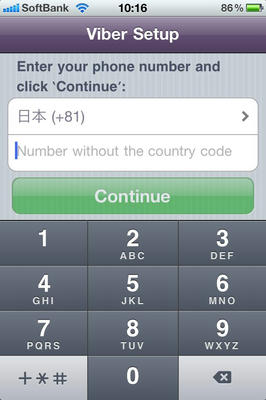
<p style="text-align: left;"><strong><font color="#ff0000">③</font></strong>この画面で「日本(+81)」を確認して、<br />
その下に自分の電話番号を入れるべし&rArr;例080-1234-5678(最初の０もしっかり入れる)<br />
そして　Continueをタップする・・・・</p>
<p style="text-align: center;"><a target="_blank" href="//iphoneninjya.blog.shinobi.jp/File/13.jpg"><img border="0" alt="13.jpg" src="//iphoneninjya.blog.shinobi.jp/Img/1291534166/" /></a></p>
<div style="text-align: left;"><br />
<strong><font color="#ff0000">④そして問題のこの画面デス！<br />
</font></strong>この画面になった瞬間にSMSでアクセスコードが送られて来た人はラッキー(５人中４人はこの画面でSMSが送られてこないハズ)<br />
この時点でアクセスコードが送られて来た人は、その４桁のコードを入れれば設定が完了です。<br />
<br />
<font color="#ff0000"><strong>この時点でアクセスコードが送れてこない人は、この画面でiPhoneのホームボタンを押し画面を閉じます。<br />
(画面を閉じた後は、アクセスコードが送られてくるまで決して開かないこと)<br />
</strong><font color="#000000">公式ページにも国際SMSを<font color="#0000ff"><strong><font size="3">何通も送らず</font></strong></font>48時間ほど待って欲しいと書いてありますので気長に待ちましょう。</font><br />
</font>&nbsp;</div>
<div style="text-align: center;"><a target="_blank" href="//iphoneninjya.blog.shinobi.jp/File/14.jpg"><img border="0" alt="14.jpg" src="//iphoneninjya.blog.shinobi.jp/Img/1291534316/" /></a><br />
<br />
&nbsp;</div>
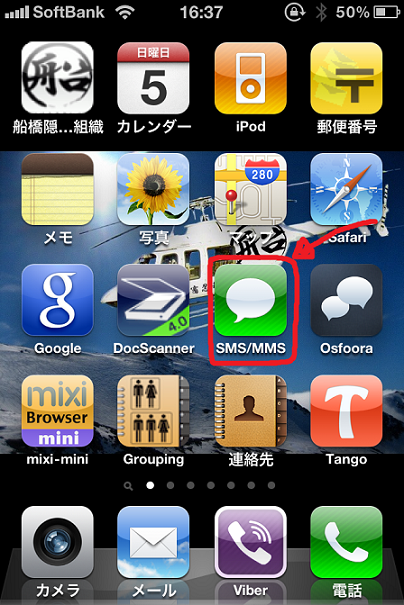
<div style="text-align: left;"><strong><font color="#ff0000">⑤</font></strong>画面を閉じた後は、普段使っているSMSアプリを起動</div>
<div style="text-align: center;"><a target="_blank" href="//iphoneninjya.blog.shinobi.jp/File/15.png"><img border="0" alt="15.png" src="//iphoneninjya.blog.shinobi.jp/Img/1291535282/" /></a><br />
<br />
&nbsp;</div>
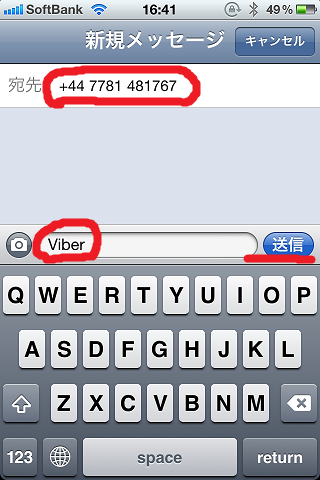
<div style="text-align: left;"><strong><font color="#ff0000">⑥</font></strong>SMSを起動させ　宛先に　　+447781481767&nbsp; に　Viber と書いて送る<br />
(国際SMSのため送信に１００円かかります)</div>
<div style="text-align: center;"><a target="_blank" href="//iphoneninjya.blog.shinobi.jp/File/16.png"><img border="0" alt="16.png" src="//iphoneninjya.blog.shinobi.jp/Img/1291535503/" /></a><br />
&nbsp;</div>
<div style="text-align: left;"><strong><font color="#ff0000">⑦</font></strong><font color="#ff0000"><font color="#000000">送った後は、１３時間ほど辛抱強く待つ(笑)<br />
</font></font><strong><font color="#ff0000">この時に、Viberのアプリには触らない方がいいデス～<br />
とにかく、明日の朝になればアクセスコードのメールが来てます。<br />
コードがきたらViberを立ち上げ４桁のコードを入れれば設定完了です！！<br />
</font><br />
</strong><br />
<br />
使ってみると素晴らしさが一瞬で分かります。<br />
<strong><font color="#ff0000">Tango、Skypeよりも優れている点は、<br />
<br />
</font><font color="#333399">１、</font></strong>音質がとてもクリア(普通の電話と変わりません)<br />
<strong><font color="#333399">２、</font></strong>すぐに繋がる。(Tangoのように相手に繋がるのに時間がかかりません)<br />
<strong><font color="#333399">３、</font></strong>アプリ内から一般電話、Viber以外の電話にもかけられる(もちろんタダではありませんが、純正電話アプリが必要なくなります)<br />
<strong><font color="#333399">４、</font></strong>アプリ内からSMSも送れる<br />
<strong><font color="#333399">５、</font></strong>全ての電話帳がでて、その中からViberを使ってる人のリストがでる。<br />
<strong><font color="#333399">６、</font></strong>Tangoではなかった、着信履歴、不在履歴が残ること<br />
<br />
以上です！超神アプリのご紹介でした。<br />
この方法で、必ずアクセスコードがきます。<br />
<a data-count="vertical" data-via="iphone_room" data-url="http://iphoneninjya.blog.shinobi.jp/Entry/24/" class="twitter-share-button" href="http://twitter.com/share">Tweet</a><script type="text/javascript" src="http://platform.twitter.com/widgets.js"></script><br />
<iframe src="http://www.facebook.com/widgets/like.php?href=http://iphoneninjya.blog.shinobi.jp/Entry/24/" frameborder="0" scrolling="no" style="border-bottom: medium none; border-left: medium none; width: 450px; height: 80px; border-top: medium none; border-right: medium none"></iframe>
<p><strong><font color="#ff0000"><font size="4"><br />
FLASHがiPhoneで見れる・・・<br />
「Sky Fire」アプリが 日本上陸しました～<br />
<font color="#0000ff">これで今まで見れなかったMixi動画も見れます！</font><br />
</font>&darr;&darr;まずは、ダウンロード&darr;&darr;</font></strong><br />
<a href="http://click.linksynergy.com/fs-bin/click?id=RFrvo7ej5/s&amp;subid=&amp;offerid=94348.1&amp;type=10&amp;tmpid=3910&amp;RD_PARM1=http%3A%2F%2Fitunes.apple.com%2Fjp%2Fapp%2Fskyfire-web-browser%2Fid384941497%3Fmt%3D8%2526ign-mpt%3Duo%253D4"><img border="0" style="width: 68px; height: 66px;" alt="icon" src="//iphoneninjya.blog.shinobi.jp/File/SSHOT~1.PNG" /></a> <img width="1" height="1" alt="icon" src="http://ad.linksynergy.com/fs-bin/show?id=RFrvo7ej5/s&amp;bids=94348.1&amp;type=10" /> <a target="itunes_store" href="http://click.linksynergy.com/fs-bin/stat?id=RFrvo7ej5/s&amp;offerid=94348&amp;type=3&amp;subid=0&amp;tmpid=2192&amp;RD_PARM1=http%253A%252F%252Fitunes.apple.com%252Fjp%252Fapp%252Fskyfire-web-browser%252Fid384941497%253Fmt%253D8%2526uo%253D4%2526partnerId%253D30"><img style="border: 0px none;" alt="Skyfire Web Browser - Skyfire Labs, Inc." src="http://ax.phobos.apple.com.edgesuite.net/images/web/linkmaker/badge_appstore-lrg.gif" /></a>&nbsp;<br />
<a target="new" href="http://click.linksynergy.com/fs-bin/click?id=RFrvo7ej5/s&amp;subid=&amp;offerid=94348.1&amp;type=10&amp;tmpid=3910&amp;RD_PARM1=http%3A%2F%2Fitunes.apple.com%2Fjp%2Fapp%2Fskyfire-web-browser%2Fid384941497%3Fmt%3D8%2526ign-mpt%3Duo%253D4">Skyfire Web Browser</a> <img width="1" height="1" alt="icon" src="http://ad.linksynergy.com/fs-bin/show?id=RFrvo7ej5/s&amp;bids=94348.1&amp;type=10" /><br />
<br />
<script type="text/javascript"><!--
google_ad_client = "pub-0953938874828968";
/* iPhone300x250 */
google_ad_slot = "1346522341";
google_ad_width = 300;
google_ad_height = 250;
//-->
</script><script type="text/javascript"
src="http://pagead2.googlesyndication.com/pagead/show_ads.js">
</script></p>
</div>
<br />
<!--FREE AREAロゴ--><a target="_blank" href="//iphoneninjya.blog.shinobi.jp/File/78696ae0.gif"><img border="0" alt="" src="//iphoneninjya.blog.shinobi.jp/Img/1290495234/" /></a><br />
<br />
<!--タンゴの記事--><a href="http://iphoneninjya.blog.shinobi.jp/Entry/20/"><font color="#3d81ee">Tango Video Calls 使い方 ☆３Gでも無料でテレビ電話☆無料アプリ</font></a><br />
<a data-lang="ja" data-count="horizontal" data-via="iphone_room" data-url="http://iphoneninjya.blog.shinobi.jp/Entry/20/" class="twitter-share-button" href="http://twitter.com/share">Tweet</a><script type="text/javascript" src="http://platform.twitter.com/widgets.js"></script><br />
<br />
<!--photoageの記事--><a href="http://iphoneninjya.blog.shinobi.jp/Entry/21/"><font color="#3d81ee">「Photo Age」写真を撮ると年齢が分かる１１５円なり。</font></a><br />
<a data-lang="ja" data-count="horizontal" data-via="iphone_room" data-url="http://iphoneninjya.blog.shinobi.jp/Entry/21/" class="twitter-share-button" href="http://twitter.com/share">Tweet</a><script type="text/javascript" src="http://platform.twitter.com/widgets.js"></script> <br />
<br />
<!--skyfireの記事--><a href="http://iphoneninjya.blog.shinobi.jp/Entry/22/"><font color="#3d81ee">Skyfire iPhone 使い方です。　FLASHが見れる・・・</font></a><br />
<a data-lang="ja" data-count="horizontal" data-via="iphone_room" data-url="http://iphoneninjya.blog.shinobi.jp/Entry/22/" class="twitter-share-button" href="http://twitter.com/share">Tweet</a><script type="text/javascript" src="http://platform.twitter.com/widgets.js"></script><br />
<br />
<br />
<!--サイト内ロゴ--><a target="_blank" href="//iphoneninjya.blog.shinobi.jp/File/site.gif"><img border="0" alt="" src="//iphoneninjya.blog.shinobi.jp/Img/1290498974/" /></a> <!--サイト内検索-->
<form action="http://www.google.co.jp/cse" id="cse-search-box">
    <div><input type="hidden" value="partner-pub-0953938874828968:58r8t1h9li5" name="cx" /> <input type="hidden" value="Shift_JIS" name="ie" /> <input type="text" name="q" /> <input type="submit" value="検索" name="sa" /></div>
</form>
<script type="text/javascript" src="http://www.google.co.jp/cse/brand?form=cse-search-box&amp;lang=ja"></script><br />
<script src='http://static.adlantis.jp/javascripts/AdLantisLoader.js' type='text/javascript' charset='utf-8'></script><!-- Begin: Adlantis, StickyZone: [iphone拡販推進室] -->
<div class="adlantis_sticky_zone zid_Mzk4Nw%3D%3D%0A">&nbsp;</div>
<!-- End: Adlantis -->]]> 
    </content>
    <author>
            <name>sato atsutoshi</name>
        </author>
  </entry>
  <entry>
    <id>iphoneninjya.blog.shinobi.jp://entry/23</id>
    <link rel="alternate" type="text/html" href="http://iphoneninjya.blog.shinobi.jp/%E6%84%8F%E5%A4%96%E3%81%A8%E7%9F%A5%E3%82%89%E3%82%8C%E3%81%A6%E3%81%84%E3%81%AA%E3%81%84iphone%E3%81%AE%E4%BD%BF%E3%81%84%E6%96%B9/iphone%E3%81%AEsafari%E3%81%A7web%E3%83%9A%E3%83%BC%E3%82%B8%E5%86%85%E3%81%AE%E3%83%86%E3%82%AD%E3%82%B9%E3%83%88-%E6%96%87%E5%AD%97-%E3%82%92%E6%A4%9C%E7%B4%A2%E3%81%99%E3%82%8B%E6%96%B9%E6%B3%95" />
    <published>2010-11-23T17:45:11+09:00</published> 
    <updated>2010-11-23T17:45:11+09:00</updated> 
    <category term="意外と知られていないiPhoneの使い方" label="意外と知られていないiPhoneの使い方" />
    <title>iPhoneのSafariでWebページ内のテキスト(文字)を検索する方法</title>
    <content mode="escaped" type="text/html" xml:lang="utf-8"> 
      <![CDATA[iPhoneの機能で意外と知られていない機能・・・<br />
<br />
それはWEB内検索(iOS4.2～)<br />
<br />
<strong><font color="#ff0000">WEB内検索とは・・・<br />
</font></strong>safariで開いているページ内の文字を検索すること。<br />
今開いているこのページ(iPhone拡販推進室)の中で<br />
<br />
例えば、<br />
「<strong><font color="#000080">iPhone</font></strong>」　という文字は、何処にあるのかを教えてくれる機能です。<br />
(文字は何でもOK)<br />
<br />
意外と長いページで見たい場所(単語)が何処にあるのか分からない時に超便利☆<br />
<br />
では、簡単ですがご紹介いたします。<br />
<br />
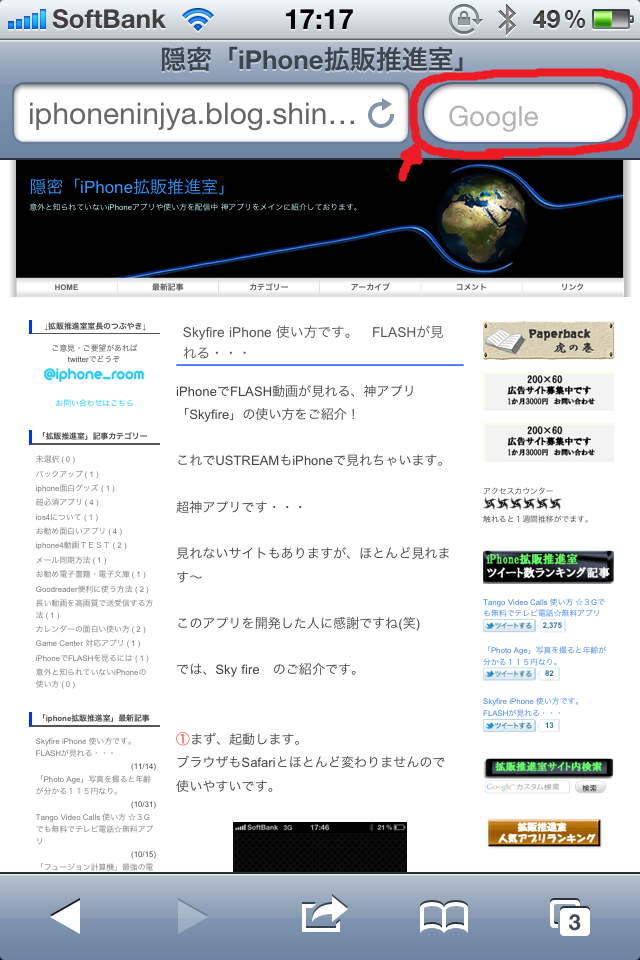
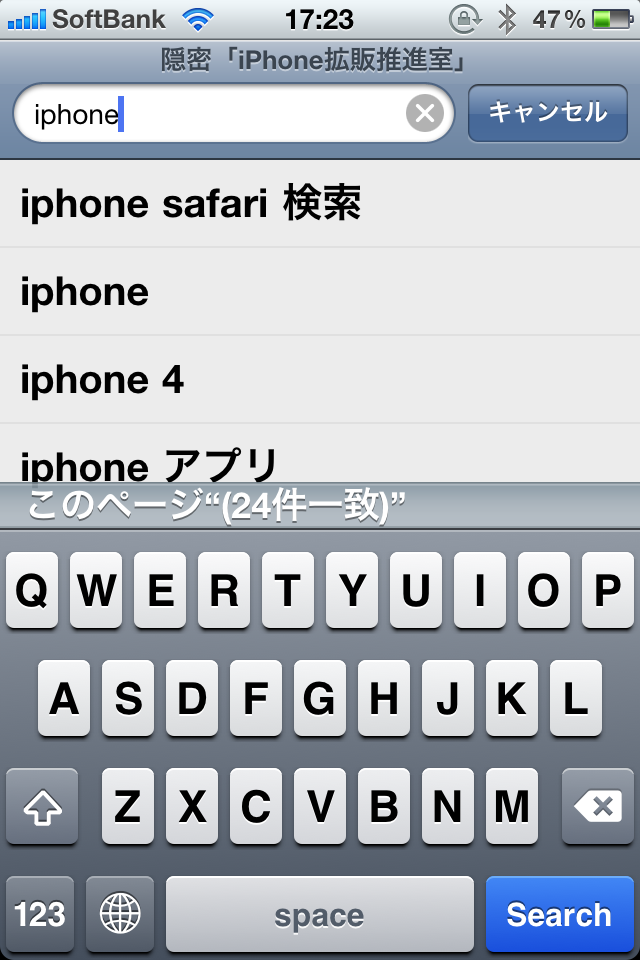
<font color="#ff0000"><strong>①</strong></font>まず、safariで見たいページをいつも通り開く<br />
右上にいつものgoogleの検索バーがある。<br />
ここをタップし、「iphone」と入れる。
<div style="text-align: center"><a target="_blank" href="//iphoneninjya.blog.shinobi.jp/File/eae09c82.png"><img border="0" alt="eae09c82.png" src="//iphoneninjya.blog.shinobi.jp/Img/1290500864/" /></a><br />
<br />
&nbsp;</div>
<div style="text-align: left"><br />
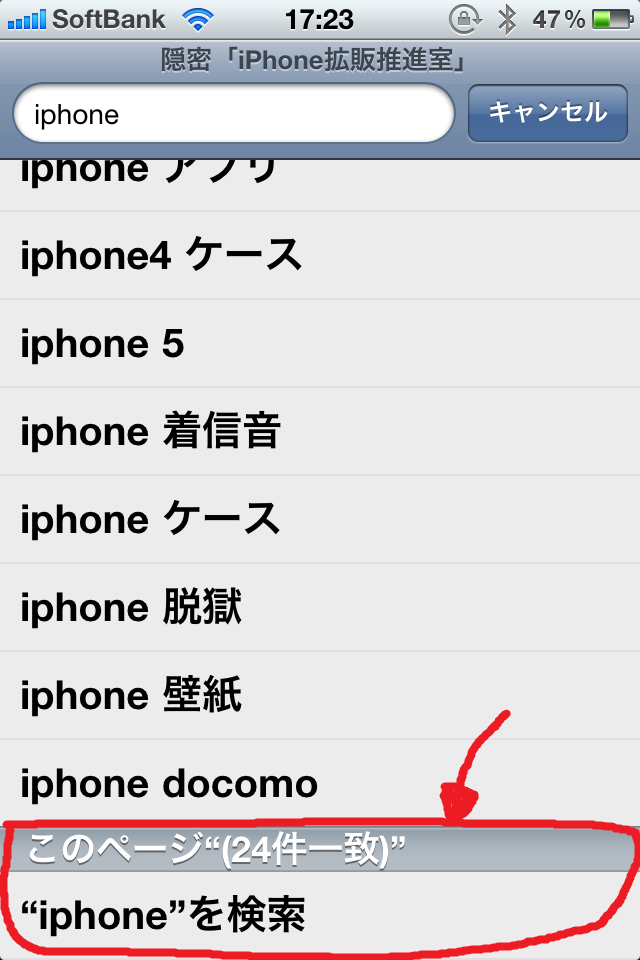
<strong><font color="#ff0000">②</font></strong>iPhoneと入れるといつも通りのこの画面になります。<br />
見慣れた画面です・・・<br />
検索の文字がたくさんでますが、一番下までスクロールさせて下さい。</div>
<div style="text-align: center"><a target="_blank" href="//iphoneninjya.blog.shinobi.jp/File/a9230917.png"><img border="0" alt="a9230917.png" src="//iphoneninjya.blog.shinobi.jp/Img/1290500977/" /></a><br />
<br />
&nbsp;</div>
<div style="text-align: left"><strong><font color="#ff0000">③</font></strong>そうすると、検索結果の一番下に「このページ」という項目があります。<br />
ここをタップします。<br />
&nbsp;</div>
<div style="text-align: center"><a target="_blank" href="//iphoneninjya.blog.shinobi.jp/File/dbb9c638.png"><img border="0" alt="dbb9c638.png" src="//iphoneninjya.blog.shinobi.jp/Img/1290501317/" /></a><br />
<br />
&nbsp;</div>
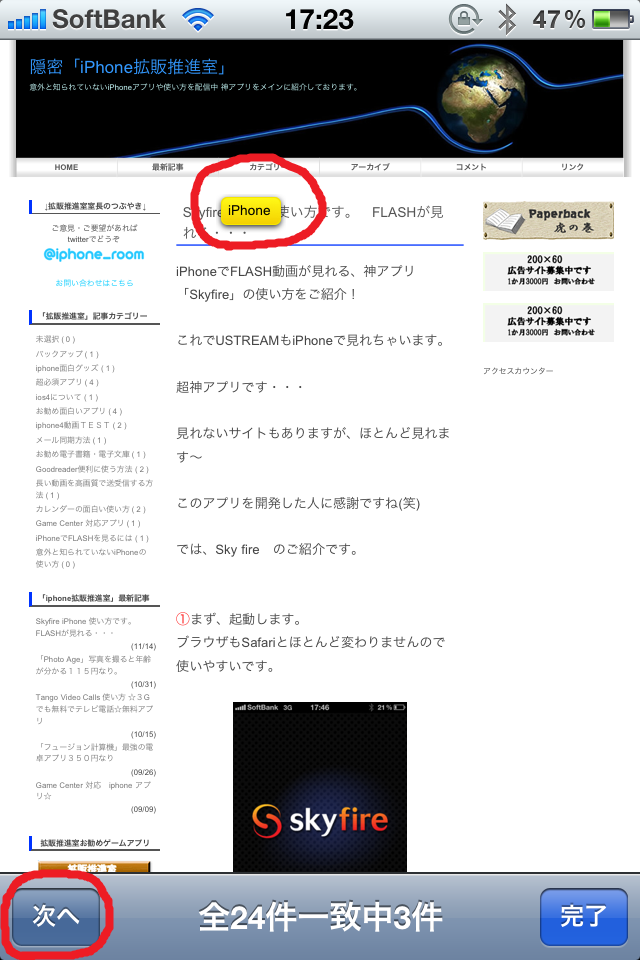
<div style="text-align: left"><strong><font color="#ff0000">④</font></strong>そーすると、ほらぁ～でたぁ～<br />
検索したiPhoneという文字がサイト内のどこにあるのがでます。<br />
左下の「次へ」をタップすると次の「iPhone」という文字がサイト内の何処にあるのかでます。<br />
&nbsp;</div>
<div style="text-align: center"><a target="_blank" href="//iphoneninjya.blog.shinobi.jp/File/d1987759.png"><img border="0" alt="d1987759.png" src="//iphoneninjya.blog.shinobi.jp/Img/1290501576/" /></a><br />
<br />
&nbsp;</div>
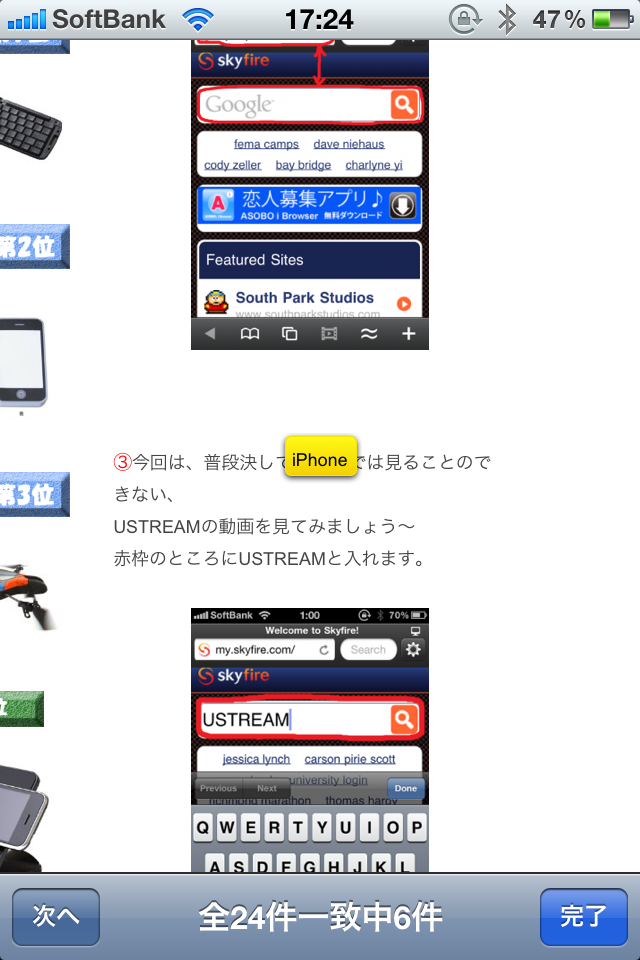
<div style="text-align: left"><strong><font color="#ff0000">⑤</font></strong>サイト内に「iPhone」という文字はたくさんあるなぁ(笑)<br />
意外と知られてない機能でしょ・・・・<br />
&nbsp;</div>
<div style="text-align: center"><a target="_blank" href="//iphoneninjya.blog.shinobi.jp/File/fbc9df19.png"><img border="0" alt="fbc9df19.png" src="//iphoneninjya.blog.shinobi.jp/Img/1290501736/" /></a><br />
<br />
<br />
今回は、簡単ですが結構意外と知らない<br />
iPhoneの機能でした！<br />
是非知り合いにも教えてあげてね！<br />
<br />
<a class="twitter-share-button" data-url="http://iphoneninjya.blog.shinobi.jp/Entry/23/" data-count="vertical" data-via="iphone_room" data-lang="ja" href="http://twitter.com/share">Tweet</a><script type="text/javascript" src="http://platform.twitter.com/widgets.js"></script></div>
<br />
<!--FREE AREAロゴ--><a target="_blank" href="//iphoneninjya.blog.shinobi.jp/File/78696ae0.gif"><img border="0" alt="" src="//iphoneninjya.blog.shinobi.jp/Img/1290495234/" /></a><br />
<br />
<!--タンゴの記事--><a href="http://iphoneninjya.blog.shinobi.jp/Entry/20/"><font color="#3d81ee">Tango Video Calls 使い方 ☆３Gでも無料でテレビ電話☆無料アプリ</font></a><br />
<a class="twitter-share-button" data-url="http://iphoneninjya.blog.shinobi.jp/Entry/20/" data-count="horizontal" data-via="iphone_room" data-lang="ja" href="http://twitter.com/share">Tweet</a><script type="text/javascript" src="http://platform.twitter.com/widgets.js"></script><br />
<br />
<!--photoageの記事--><a href="http://iphoneninjya.blog.shinobi.jp/Entry/21/"><font color="#3d81ee">「Photo Age」写真を撮ると年齢が分かる１１５円なり。</font></a><br />
<a class="twitter-share-button" data-url="http://iphoneninjya.blog.shinobi.jp/Entry/21/" data-count="horizontal" data-via="iphone_room" data-lang="ja" href="http://twitter.com/share">Tweet</a><script type="text/javascript" src="http://platform.twitter.com/widgets.js"></script> <br />
<br />
<!--skyfireの記事--><a href="http://iphoneninjya.blog.shinobi.jp/Entry/22/"><font color="#3d81ee">Skyfire iPhone 使い方です。　FLASHが見れる・・・</font></a><br />
<a class="twitter-share-button" data-url="http://iphoneninjya.blog.shinobi.jp/Entry/22/" data-count="horizontal" data-via="iphone_room" data-lang="ja" href="http://twitter.com/share">Tweet</a><script type="text/javascript" src="http://platform.twitter.com/widgets.js"></script><br />
<br />
<br />
<!--サイト内ロゴ--><a target="_blank" href="//iphoneninjya.blog.shinobi.jp/File/site.gif"><img border="0" alt="" src="//iphoneninjya.blog.shinobi.jp/Img/1290498974/" /></a> <!--サイト内検索-->
<form id="cse-search-box" action="http://www.google.co.jp/cse">
    <div><input type="hidden" name="cx" value="partner-pub-0953938874828968:58r8t1h9li5" /> <input type="hidden" name="ie" value="Shift_JIS" /> <input name="q" type="text" /> <input type="submit" name="sa" value="検索" /></div>
</form>]]> 
    </content>
    <author>
            <name>sato atsutoshi</name>
        </author>
  </entry>
  <entry>
    <id>iphoneninjya.blog.shinobi.jp://entry/22</id>
    <link rel="alternate" type="text/html" href="http://iphoneninjya.blog.shinobi.jp/iphone%E3%81%A7flash%E3%82%92%E8%A6%8B%E3%82%8B%E3%81%AB%E3%81%AF/%E6%97%A5%E6%9C%AC%E4%B8%8A%E9%99%B8skyfire%20iphone%20%E4%BD%BF%E3%81%84%E6%96%B9%E3%81%A7%E3%81%99flash%E3%81%8C%E8%A6%8B%E3%82%8C%E3%82%8B%E3%83%BB%E3%83%BB%E3%83%BB" />
    <published>2010-11-14T01:09:18+09:00</published> 
    <updated>2010-11-14T01:09:18+09:00</updated> 
    <category term="iPhoneでFLASHを見るには" label="iPhoneでFLASHを見るには" />
    <title>日本上陸Skyfire iPhone 使い方ですFLASHが見れる・・・</title>
    <content mode="escaped" type="text/html" xml:lang="utf-8"> 
      <![CDATA[<p><strong><font color="#ff0000"><font size="4">FLASHがiPhoneで見れる・・・<br />
「Sky Fire」 日本上陸しました～<br />
<br />
</font>&darr;&darr;まずは、ダウンロード&darr;&darr;</font></strong><br />
<a href="http://click.linksynergy.com/fs-bin/click?id=RFrvo7ej5/s&amp;subid=&amp;offerid=94348.1&amp;type=10&amp;tmpid=3910&amp;RD_PARM1=http%3A%2F%2Fitunes.apple.com%2Fjp%2Fapp%2Fskyfire-web-browser%2Fid384941497%3Fmt%3D8%2526ign-mpt%3Duo%253D4"><img border="0" alt="icon" style="width: 68px; height: 66px" src="//iphoneninjya.blog.shinobi.jp/File/SSHOT~1.PNG" /></a> <img alt="icon" width="1" height="1" src="http://ad.linksynergy.com/fs-bin/show?id=RFrvo7ej5/s&amp;bids=94348.1&amp;type=10" /> <a target="itunes_store" href="http://click.linksynergy.com/fs-bin/stat?id=RFrvo7ej5/s&amp;offerid=94348&amp;type=3&amp;subid=0&amp;tmpid=2192&amp;RD_PARM1=http%253A%252F%252Fitunes.apple.com%252Fjp%252Fapp%252Fskyfire-web-browser%252Fid384941497%253Fmt%253D8%2526uo%253D4%2526partnerId%253D30"><img alt="Skyfire Web Browser - Skyfire Labs, Inc." style="border-bottom: 0px; border-left: 0px; border-top: 0px; border-right: 0px" src="http://ax.phobos.apple.com.edgesuite.net/images/web/linkmaker/badge_appstore-lrg.gif" /></a>&nbsp;<br />
<a target="new" href="http://click.linksynergy.com/fs-bin/click?id=RFrvo7ej5/s&amp;subid=&amp;offerid=94348.1&amp;type=10&amp;tmpid=3910&amp;RD_PARM1=http%3A%2F%2Fitunes.apple.com%2Fjp%2Fapp%2Fskyfire-web-browser%2Fid384941497%3Fmt%3D8%2526ign-mpt%3Duo%253D4">Skyfire Web Browser</a> <img alt="icon" width="1" height="1" src="http://ad.linksynergy.com/fs-bin/show?id=RFrvo7ej5/s&amp;bids=94348.1&amp;type=10" /><br />
<br />
<img alt="icon" width="1" height="1" src="http://ad.linksynergy.com/fs-bin/show?id=RFrvo7ej5/s&amp;bids=94348.1&amp;type=10" />iPhoneでFLASH動画が見れる、神アプリ「Skyfire」の使い方をご紹介！<br />
<br />
これでUSTREAMもiPhoneで見れちゃいます。<br />
<br />
超神アプリです・・・<br />
<br />
見れないサイトもありますが、ほとんど見れます～<br />
<br />
このアプリを開発した人に感謝ですね(笑)<br />
<br />
では、Sky fire　のご紹介です。<br />
<script type="text/javascript"><!--
google_ad_client = "pub-0953938874828968";
/* iphonブログ200x200 */
google_ad_slot = "9196497271";
google_ad_width = 200;
google_ad_height = 200;
//-->
</script><script type="text/javascript"
src="http://pagead2.googlesyndication.com/pagead/show_ads.js">
</script><br />
<strong><font color="#ff0000"><font size="3">①</font></font></strong>まず、起動します。<br />
ブラウザもSafariとほとんど変わりませんので使いやすいです。<br />
&nbsp;</p>
<p style="text-align: center"><a target="_blank" href="//iphoneninjya.blog.shinobi.jp/File/e313fcf0.png"><img border="0" alt="e313fcf0.png" src="//iphoneninjya.blog.shinobi.jp/Img/1289554160/" /></a><br />
&nbsp;</p>
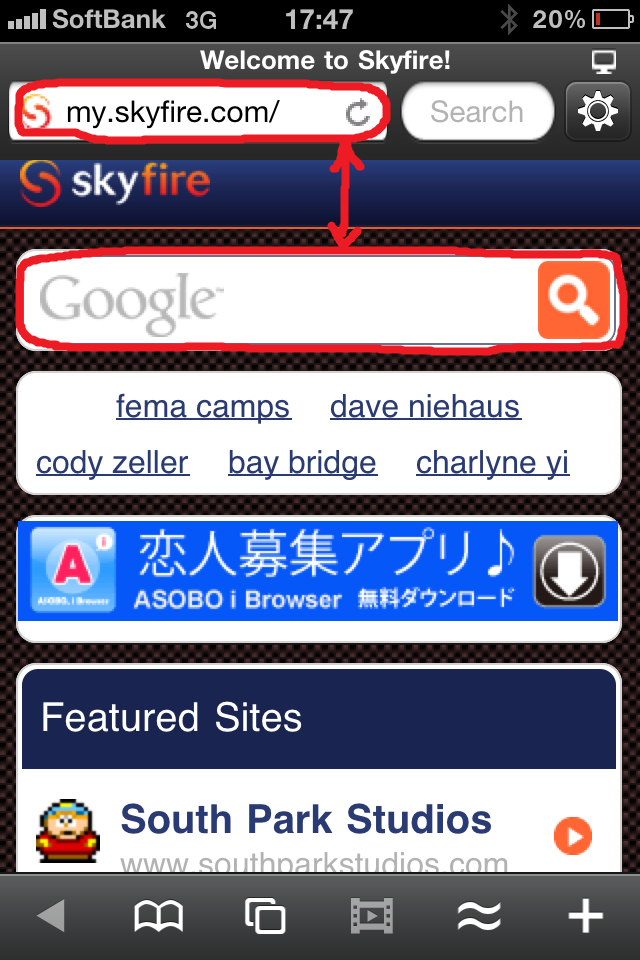
<strong><font color="#ff0000"><font size="3">②</font></font></strong>　Skyfireのホーム画面です。<br />
ホーム画面でよく使うのは、赤枠のところ位です。<br />
上の赤枠は、見たいFLASH動画のサイトのURLを直接入れてもOK<br />
<br />
下の赤枠は、グーグルで検索できます。(日本語可)<br />
<br />
<div style="text-align: center"><a target="_blank" href="//iphoneninjya.blog.shinobi.jp/File/6ad63e30.png"><img border="0" alt="6ad63e30.png" src="//iphoneninjya.blog.shinobi.jp/Img/1289554259/" /></a><br />
<br />
&nbsp;</div>
<div style="text-align: left"><br />
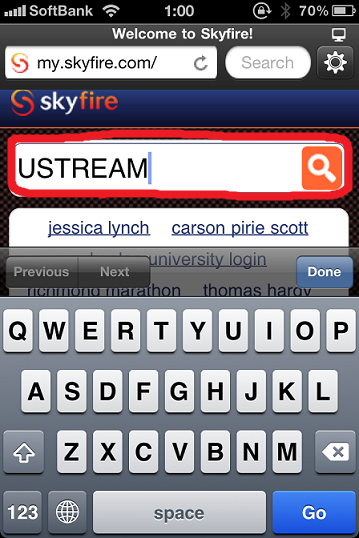
<strong><font color="#ff0000"><font size="3">③</font></font></strong>今回は、普段決してiPhoneでは見ることのできない、<br />
USTREAMの動画を見てみましょう～<br />
赤枠のところにUSTREAMと入れます。<br />
&nbsp;</div>
<div style="text-align: center"><a target="_blank" href="//iphoneninjya.blog.shinobi.jp/File/c4e71fc3.png"><img border="0" alt="c4e71fc3.png" src="//iphoneninjya.blog.shinobi.jp/Img/1289665656/" /></a><br />
&nbsp;</div>
<br />
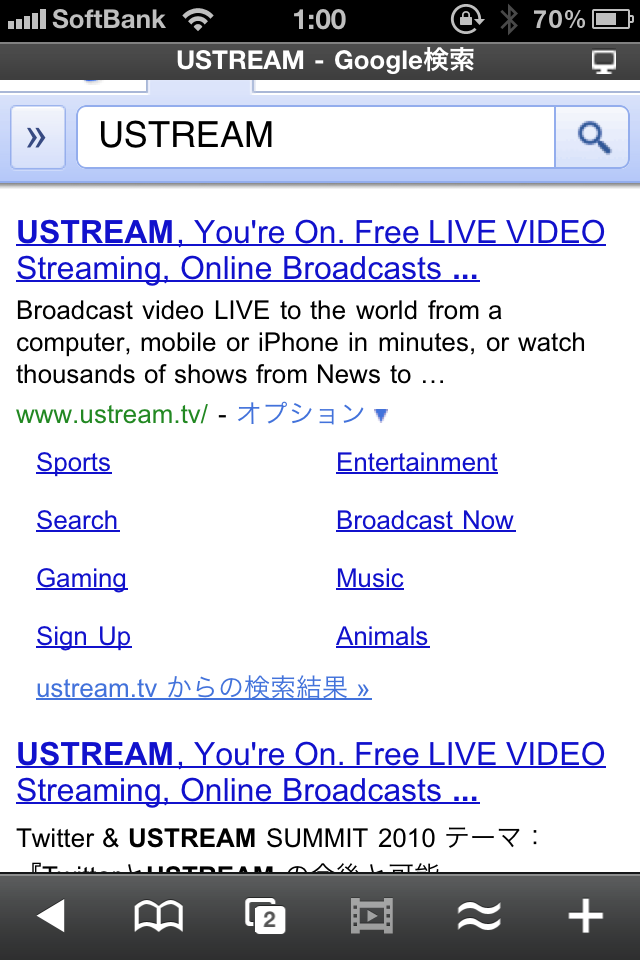
<strong><font color="#ff0000"><font size="3">④</font></font></strong>検索結果は、googleです。日本のgoogle検索がでますので安心安心。。。<br />
Safariとまるっきり変わりません。<br />
<br />
<div style="text-align: center"><a target="_blank" href="//iphoneninjya.blog.shinobi.jp/File/c58e102e.png"><img border="0" alt="c58e102e.png" src="//iphoneninjya.blog.shinobi.jp/Img/1289665929/" /></a></div>
<br />
<br />
<br />
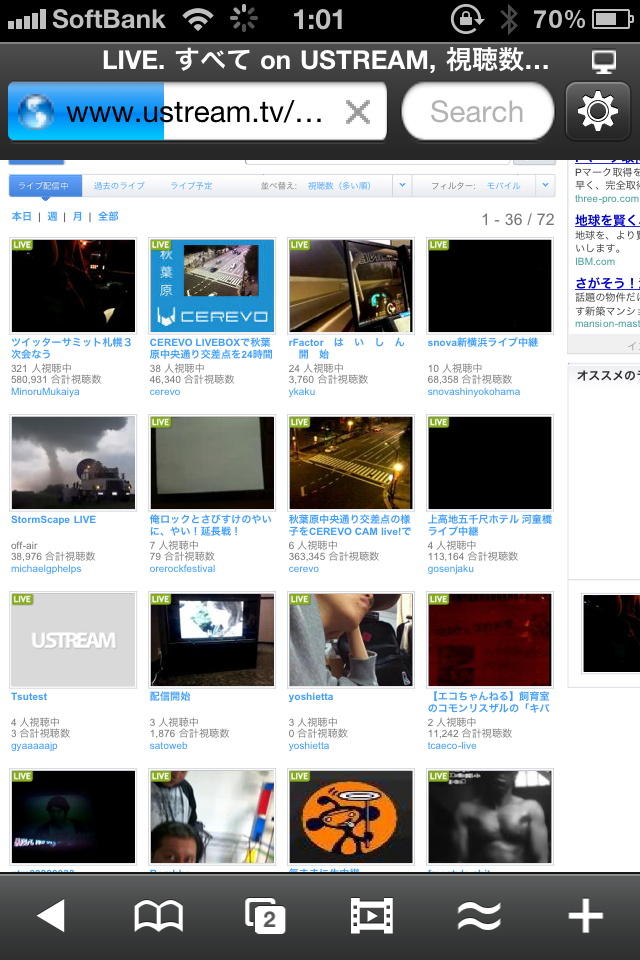
<font size="3"><strong><font color="#ff0000">⑤</font></strong></font>そしたら、動画を適当に選んでみましょう～<br />
<br />
<div style="text-align: center"><a target="_blank" href="//iphoneninjya.blog.shinobi.jp/File/3fe52941.png"><img border="0" alt="3fe52941.png" src="//iphoneninjya.blog.shinobi.jp/Img/1289666857/" /></a></div>
<br />
<br />
<br />
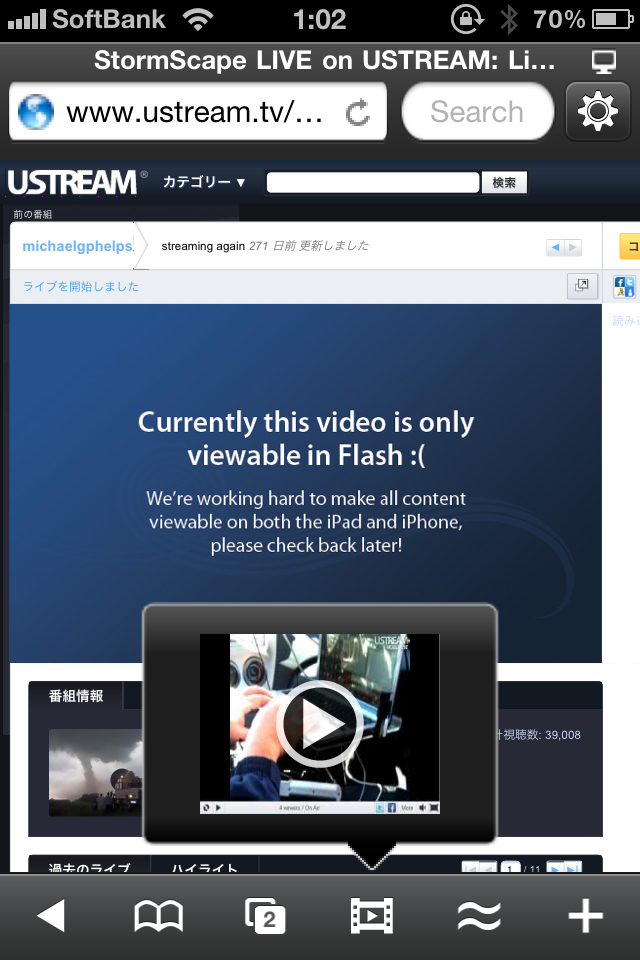
<font size="3"><strong><font color="#ff0000">⑥</font></strong></font>きたぁぁぁぁ～！！普段見れない画面なのに、下の方に変な小窓が・・・・<br />
この小窓の再生ボタンをタップするとなんと、見れてしまうのだぁぁ～<br />
Sky fire すげぇぇぇ～<br />
<div style="text-align: center"><a target="_blank" href="//iphoneninjya.blog.shinobi.jp/File/1000001884.png"><img border="0" alt="1000001884.png" src="//iphoneninjya.blog.shinobi.jp/Img/1289667091/" /></a></div>
<div style="text-align: center"><br />
<br />
&nbsp;</div>
<div style="text-align: left"><font size="3"><strong><font color="#ff0000">⑦</font></strong></font>わ～お！普通に見れる・・・３GよりもWIFIの方が綺麗に移りますョ～<br />
Sky fire 神アプリ、恐るべしです。<br />
&nbsp;</div>
<div style="text-align: center"><a target="_blank" href="//iphoneninjya.blog.shinobi.jp/File/da41ece8.png"><img border="0" alt="da41ece8.png" src="//iphoneninjya.blog.shinobi.jp/Img/1289667893/" /></a></div>
<br />
<br />
<div style="text-align: center">こんなに簡単に今まで見れなかったFLASH動画が<br />
<br />
見れてしまうんです・・・・・・<br />
<br />
&nbsp;</div>
<div style="text-align: left"><font size="3"><u><strong><font color="#0000ff">あとは、各種設定をご紹介<br />
</font></strong></u></font></div>
<div style="text-align: center"><a target="_blank" href="//iphoneninjya.blog.shinobi.jp/File/11.gif"><img border="0" alt="11.gif" src="//iphoneninjya.blog.shinobi.jp/Img/1289555107/" /></a></div>
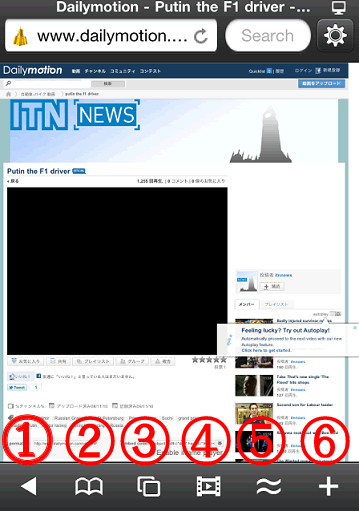
<font color="#ff0000">①・・・ブラウザの戻るボタン<br />
</font><br />
<font color="#ff0000">②・・・ブックマーク(ここでブックマークの登録ができます。)<br />
</font><strong><font color="#ff0000"><br />
</font></strong><font color="#ff0000">③・・・Safariと一緒です。何ページでも開けます。とても便利機能<br />
<br />
</font><font color="#ff0000">④・・・FLASH動画再生ボタン<br />
</font><br />
<font color="#ff0000">⑤・・・ほとんど使いません。開いてるページに対してのリンクページ<br />
<br />
</font><font color="#ff0000">⑥・・・開いてるページのURLをメールしたり、FaceBook, Twitterに送れます。<br />
</font><br />
<p><font color="#0000ff"><strong><font size="4">FLASHがiPhoneで見れる・・・<br />
「Sky Fire」 日本上陸しました～<br />
</font></strong></font><strong><font color="#ff0000"><font size="4"><br />
</font>&darr;&darr;まずは、ダウンロード&darr;&darr;</font></strong><br />
<a href="http://click.linksynergy.com/fs-bin/click?id=RFrvo7ej5/s&amp;subid=&amp;offerid=94348.1&amp;type=10&amp;tmpid=3910&amp;RD_PARM1=http%3A%2F%2Fitunes.apple.com%2Fjp%2Fapp%2Fskyfire-web-browser%2Fid384941497%3Fmt%3D8%2526ign-mpt%3Duo%253D4"><img border="0" alt="icon" style="width: 68px; height: 66px" src="//iphoneninjya.blog.shinobi.jp/File/SSHOT~1.PNG" /></a> <img alt="icon" width="1" height="1" src="http://ad.linksynergy.com/fs-bin/show?id=RFrvo7ej5/s&amp;bids=94348.1&amp;type=10" /> <a target="itunes_store" href="http://click.linksynergy.com/fs-bin/stat?id=RFrvo7ej5/s&amp;offerid=94348&amp;type=3&amp;subid=0&amp;tmpid=2192&amp;RD_PARM1=http%253A%252F%252Fitunes.apple.com%252Fjp%252Fapp%252Fskyfire-web-browser%252Fid384941497%253Fmt%253D8%2526uo%253D4%2526partnerId%253D30"><img alt="Skyfire Web Browser - Skyfire Labs, Inc." style="border-bottom: 0px; border-left: 0px; border-top: 0px; border-right: 0px" src="http://ax.phobos.apple.com.edgesuite.net/images/web/linkmaker/badge_appstore-lrg.gif" /></a>&nbsp;<br />
<a target="new" href="http://click.linksynergy.com/fs-bin/click?id=RFrvo7ej5/s&amp;subid=&amp;offerid=94348.1&amp;type=10&amp;tmpid=3910&amp;RD_PARM1=http%3A%2F%2Fitunes.apple.com%2Fjp%2Fapp%2Fskyfire-web-browser%2Fid384941497%3Fmt%3D8%2526ign-mpt%3Duo%253D4">Skyfire Web Browser</a> <img alt="icon" width="1" height="1" src="http://ad.linksynergy.com/fs-bin/show?id=RFrvo7ej5/s&amp;bids=94348.1&amp;type=10" /><strong><font color="#ff0000"><u><font size="3"><br />
<br />
<a href="http://iphoneninjya.blog.shinobi.jp/Entry/20/">iPhone,アンドロイド携帯での２４時間無料通話<br />
Tango video calls アプリの使い方はこちら</a></font></u></font></strong></p>
<br />
<a class="twitter-share-button" data-count="vertical" data-via="iphone_room" data-url="http://iphoneninjya.blog.shinobi.jp/Entry/22/" href="http://twitter.com/share">Tweet</a><script type="text/javascript" src="http://platform.twitter.com/widgets.js"></script><br />
<iframe src="http://www.facebook.com/widgets/like.php?href=http://iphoneninjya.blog.shinobi.jp/Entry/22/" frameborder="0" scrolling="no" style="border-bottom: medium none; border-left: medium none; width: 450px; height: 80px; border-top: medium none; border-right: medium none"></iframe>
<br/>
<script type="text/javascript"><!--
google_ad_client = "pub-0953938874828968";
/* iphoneブログ200x200 */
google_ad_slot = "2169555986";
google_ad_width = 200;
google_ad_height = 200;
//-->
</script><script type="text/javascript"
src="http://pagead2.googlesyndication.com/pagead/show_ads.js">
</script><br />
<script src='http://static.adlantis.jp/javascripts/AdLantisLoader.js' type='text/javascript' charset='utf-8'></script><!-- Begin: Adlantis, StickyZone: [iphone拡販推進室] -->
<div class="adlantis_sticky_zone zid_Mzk4Nw%3D%3D%0A">&nbsp;</div>
<!-- End: Adlantis -->]]> 
    </content>
    <author>
            <name>sato atsutoshi</name>
        </author>
  </entry>
  <entry>
    <id>iphoneninjya.blog.shinobi.jp://entry/21</id>
    <link rel="alternate" type="text/html" href="http://iphoneninjya.blog.shinobi.jp/%E3%81%8A%E5%8B%A7%E3%82%81%E9%9D%A2%E7%99%BD%E3%81%84%E3%82%A2%E3%83%97%E3%83%AA/%E3%80%8Cphoto%20age%E3%80%8D%E5%86%99%E7%9C%9F%E3%82%92%E6%92%AE%E3%82%8B%E3%81%A8%E5%B9%B4%E9%BD%A2%E3%81%8C%E5%88%86%E3%81%8B%E3%82%8B%EF%BC%91%EF%BC%91%EF%BC%95%E5%86%86%E3%81%AA%E3%82%8A%E3%80%82" />
    <published>2010-10-31T19:49:35+09:00</published> 
    <updated>2010-10-31T19:49:35+09:00</updated> 
    <category term="お勧め面白いアプリ" label="お勧め面白いアプリ" />
    <title>「Photo Age」写真を撮ると年齢が分かる１１５円なり。</title>
    <content mode="escaped" type="text/html" xml:lang="utf-8"> 
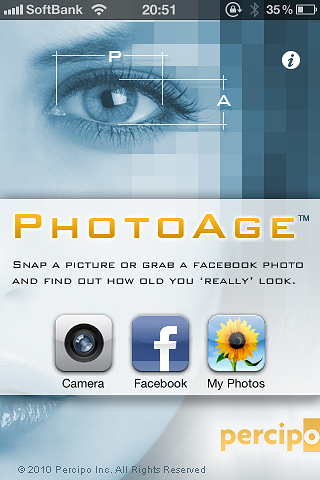
      <![CDATA[<p>これは、面白いアプリ☆<br />
<br />
久しぶりのiPhone,らしいアプリです。<br />
<br />
その名も　<a target="itunes_store" href="http://click.linksynergy.com/fs-bin/stat?id=RFrvo7ej5/s&amp;offerid=94348&amp;type=3&amp;subid=0&amp;tmpid=2192&amp;RD_PARM1=http%253A%252F%252Fitunes.apple.com%252Fjp%252Fapp%252Fphotoage%252Fid391310821%253Fmt%253D8%2526uo%253D4%2526partnerId%253D30">PhotoAge - Percipo Inc.</a>　です。<br />
<br />
名前の通り、写真で撮った人の年齢を判別してくれます。<br />
<br />
しかも、思ったほど正確(笑)　これはどーやって判別してるんだろ？<br />
<br />
スゴイ技術だな～<br />
<br />
<strong><font color="#ff0000">まずはダウンロードから<br />
</font></strong><a href="http://click.linksynergy.com/fs-bin/click?id=RFrvo7ej5/s&amp;offerid=94348.4391310821&amp;type=2&amp;subid=0"><img border="0" alt="" src="http://a1.phobos.apple.com/us/r1000/049/Purple/6f/e7/e7/mzi.yjzqnmjh.png" /></a><img border="0" alt="" width="1" height="1" src="http://ad.linksynergy.com/fs-bin/show?id=RFrvo7ej5/s&amp;bids=94348.4391310821&amp;type=2&amp;subid=0" /><a target="itunes_store" href="http://click.linksynergy.com/fs-bin/stat?id=RFrvo7ej5/s&amp;offerid=94348&amp;type=3&amp;subid=0&amp;tmpid=2192&amp;RD_PARM1=http%253A%252F%252Fitunes.apple.com%252Fjp%252Fapp%252Fphotoage%252Fid391310821%253Fmt%253D8%2526uo%253D4%2526partnerId%253D30"><img alt="PhotoAge - Percipo Inc." style="border-bottom: 0px; border-left: 0px; border-top: 0px; border-right: 0px" src="http://ax.phobos.apple.com.edgesuite.net/images/web/linkmaker/badge_appstore-lrg.gif" /></a><br />
<a href="http://click.linksynergy.com/fs-bin/click?id=RFrvo7ej5/s&amp;offerid=94348.4391310821&amp;type=2&amp;subid=0">PhotoAge</a><img border="0" alt="" width="1" height="1" src="http://ad.linksynergy.com/fs-bin/show?id=RFrvo7ej5/s&amp;bids=94348.4391310821&amp;type=2&amp;subid=0" />&nbsp;&nbsp;<br />
<br />
<br />
ではご紹介です☆</p>
<p style="text-align: center"><a target="_blank" href="//iphoneninjya.blog.shinobi.jp/File/1000001791.png"><img border="0" alt="1000001791.png" src="//iphoneninjya.blog.shinobi.jp/Img/1288521274/" /></a><br />
<br />
<br />
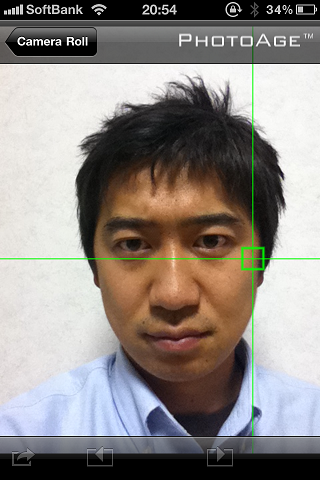
実に簡単です☆ただ写真を撮るだけでOK！アルバムにある写真でもOKです！<br />
この緑の線が、近未来っぽっく動くのです～<br />
<br />
<a target="_blank" href="//iphoneninjya.blog.shinobi.jp/File/1000001793.png"><img border="0" alt="1000001793.png" src="//iphoneninjya.blog.shinobi.jp/Img/1288521417/" /></a></p>
<br />
ジャーン！！でました！！28歳とでました。２歳若いですが当たってる～<br />
このアプリの凄いところは、同じ写真で何回やっても年齢が一緒になる。スゴイね！<br />
<br />
<br />
<div style="text-align: center"><a target="_blank" href="//iphoneninjya.blog.shinobi.jp/File/1000001794.png"><img border="0" alt="1000001794.png" src="//iphoneninjya.blog.shinobi.jp/Img/1288521609/" /></a></div>
<div style="text-align: center">どうですか？このアプリ☆飲み会で絶対盛り上がること間違いなし☆<br />
お勧めです！<br />
<a href="http://click.linksynergy.com/fs-bin/click?id=RFrvo7ej5/s&amp;offerid=94348.4391310821&amp;type=2&amp;subid=0"><img border="0" alt="" src="http://a1.phobos.apple.com/us/r1000/049/Purple/6f/e7/e7/mzi.yjzqnmjh.png" /></a><img border="0" alt="" width="1" height="1" src="http://ad.linksynergy.com/fs-bin/show?id=RFrvo7ej5/s&amp;bids=94348.4391310821&amp;type=2&amp;subid=0" /><a target="itunes_store" href="http://click.linksynergy.com/fs-bin/stat?id=RFrvo7ej5/s&amp;offerid=94348&amp;type=3&amp;subid=0&amp;tmpid=2192&amp;RD_PARM1=http%253A%252F%252Fitunes.apple.com%252Fjp%252Fapp%252Fphotoage%252Fid391310821%253Fmt%253D8%2526uo%253D4%2526partnerId%253D30"><img alt="PhotoAge - Percipo Inc." style="border-bottom: 0px; border-left: 0px; border-top: 0px; border-right: 0px" src="http://ax.phobos.apple.com.edgesuite.net/images/web/linkmaker/badge_appstore-lrg.gif" /></a><br />
<a href="http://click.linksynergy.com/fs-bin/click?id=RFrvo7ej5/s&amp;offerid=94348.4391310821&amp;type=2&amp;subid=0">PhotoAge</a><img border="0" alt="" width="1" height="1" src="http://ad.linksynergy.com/fs-bin/show?id=RFrvo7ej5/s&amp;bids=94348.4391310821&amp;type=2&amp;subid=0" />&nbsp;&nbsp;<br />
<br />
<br />
<div class="amazlet-box" style="margin-bottom: 0px">
<div class="amazlet-image" style="margin: 0px 12px 1px 0px; float: left"><a target="_blank" href="http://www.amazon.co.jp/exec/obidos/ASIN/4408108596/funabashionmi-22/ref=nosim/" name="amazletlink"><img alt="事を成す 孫正義の新30年ビジョン" style="border-bottom: medium none; border-left: medium none; border-top: medium none; border-right: medium none" src="http://ecx.images-amazon.com/images/I/51nUX4vVTyL._SL160_.jpg" /></a></div>
<div class="amazlet-info" style="line-height: 120%; margin-bottom: 10px">
<div class="amazlet-name" style="line-height: 120%; margin-bottom: 10px"><a target="_blank" href="http://www.amazon.co.jp/exec/obidos/ASIN/4408108596/funabashionmi-22/ref=nosim/" name="amazletlink">事を成す 孫正義の新30年ビジョン</a>
<div class="amazlet-powered-date" style="line-height: 120%; margin-top: 5px; font-size: 80%">posted with <a title="事を成す 孫正義の新30年ビジョン" target="_blank" href="http://www.amazlet.com/browse/ASIN/4408108596/funabashionmi-22/ref=nosim/">amazlet</a> at 10.10.31</div>
</div>
<div class="amazlet-detail">井上 篤夫 <br />
実業之日本社 <br />
売り上げランキング: 4365<br />
&nbsp;</div>
<div class="amazlet-sub-info" style="float: left">
<div class="amazlet-review" style="margin-top: 10px; margin-bottom: 10px">
<div class="amazlet-review-average" style="margin-bottom: 5px">おすすめ度の平均: <img alt="4.0" src="http://images-jp.amazon.com/images/G/09/x-locale/common/customer-reviews/stars-4-0.gif" /></div>
<img alt="4" src="http://images-jp.amazon.com/images/G/09/x-locale/common/customer-reviews/stars-4-0.gif" /> シンプルなミッションが惹きつけます<br />
<img alt="1" src="http://images-jp.amazon.com/images/G/09/x-locale/common/customer-reviews/stars-1-0.gif" /> ソフトバンク広報室肝いりの、ただの提灯本<br />
<img alt="5" src="http://images-jp.amazon.com/images/G/09/x-locale/common/customer-reviews/stars-5-0.gif" /> 誰がために涙するか<br />
<img alt="5" src="http://images-jp.amazon.com/images/G/09/x-locale/common/customer-reviews/stars-5-0.gif" /> 活力が出る<br />
<img alt="5" src="http://images-jp.amazon.com/images/G/09/x-locale/common/customer-reviews/stars-5-0.gif" /> 理念とビジョンと戦略<br />
&nbsp;</div>
<div class="amazlet-link" style="margin-top: 5px"><a target="_blank" href="http://www.amazon.co.jp/exec/obidos/ASIN/4408108596/funabashionmi-22/ref=nosim/" name="amazletlink">Amazon.co.jp で詳細を見る</a></div>
</div>
</div>
<div class="amazlet-footer" style="clear: left">&nbsp;</div>
</div>
<br />
<div class="amazlet-box" style="margin-bottom: 0px">
<div class="amazlet-image" style="margin: 0px 12px 1px 0px; float: left"><a target="_blank" href="http://www.amazon.co.jp/exec/obidos/ASIN/4492501657/funabashionmi-22/ref=nosim/" name="amazletlink"><img alt="ソフトバンク「常識外」の成功法則" style="border-bottom: medium none; border-left: medium none; border-top: medium none; border-right: medium none" src="http://ecx.images-amazon.com/images/I/41YKJHAMZXL._SL160_.jpg" /></a></div>
<div class="amazlet-info" style="line-height: 120%; margin-bottom: 10px">
<div class="amazlet-name" style="line-height: 120%; margin-bottom: 10px"><a target="_blank" href="http://www.amazon.co.jp/exec/obidos/ASIN/4492501657/funabashionmi-22/ref=nosim/" name="amazletlink">ソフトバンク「常識外」の成功法則</a>
<div class="amazlet-powered-date" style="line-height: 120%; margin-top: 5px; font-size: 80%">posted with <a title="ソフトバンク「常識外」の成功法則" target="_blank" href="http://www.amazlet.com/browse/ASIN/4492501657/funabashionmi-22/ref=nosim/">amazlet</a> at 10.10.31</div>
</div>
<div class="amazlet-detail">三木 雄信 <br />
東洋経済新報社 <br />
売り上げランキング: 78519<br />
&nbsp;</div>
<div class="amazlet-sub-info" style="float: left">
<div class="amazlet-review" style="margin-top: 10px; margin-bottom: 10px">
<div class="amazlet-review-average" style="margin-bottom: 5px">おすすめ度の平均: <img alt="5.0" src="http://images-jp.amazon.com/images/G/09/x-locale/common/customer-reviews/stars-5-0.gif" /></div>
<img alt="5" src="http://images-jp.amazon.com/images/G/09/x-locale/common/customer-reviews/stars-5-0.gif" /> 経営者としての孫正義<br />
<img alt="4" src="http://images-jp.amazon.com/images/G/09/x-locale/common/customer-reviews/stars-4-0.gif" /> 孫正義氏の側近が書いたソフトバンク経営の実態<br />
<img alt="5" src="http://images-jp.amazon.com/images/G/09/x-locale/common/customer-reviews/stars-5-0.gif" /> ビジネスマンを目指す方にはおすすめ<br />
<img alt="5" src="http://images-jp.amazon.com/images/G/09/x-locale/common/customer-reviews/stars-5-0.gif" /> 孫正義になるのは難しいが、学ぶべきポイントは多い<br />
<img alt="5" src="http://images-jp.amazon.com/images/G/09/x-locale/common/customer-reviews/stars-5-0.gif" /> 懐かしくもあり、新しく知ることもあり。<br />
&nbsp;</div>
<div class="amazlet-link" style="margin-top: 5px"><a target="_blank" href="http://www.amazon.co.jp/exec/obidos/ASIN/4492501657/funabashionmi-22/ref=nosim/" name="amazletlink">Amazon.co.jp で詳細を見る</a></div>
</div>
</div>
<div class="amazlet-footer" style="clear: left">&nbsp;</div>
</div>
<br />
<div style="text-align: left"><a class="twitter-share-button" data-via="iphone_room" data-count="vertical" data-lang="ja" data-url="http://iphoneninjya.blog.shinobi.jp/Entry/21/" href="http://twitter.com/share">Tweet</a><script type="text/javascript" src="http://platform.twitter.com/widgets.js"></script><br />
&nbsp;</div>
</div>]]> 
    </content>
    <author>
            <name>sato atsutoshi</name>
        </author>
  </entry>
</feed>